
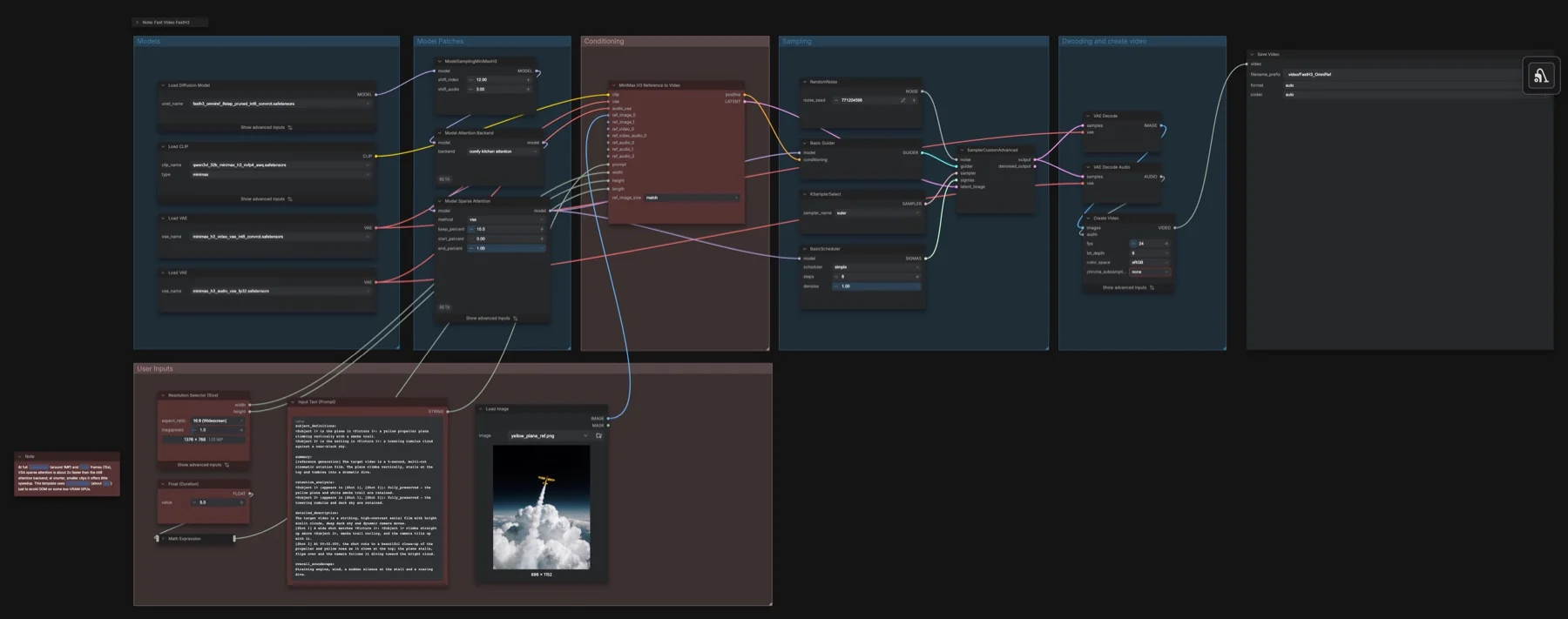
Short answer: Use a reference image and a prompt with the eight-step FastH3 OmniRef checkpoint. The listed files total about 41.32 GB on disk. The repositories list MiniMax H3 Community License Agreement.
Output example
This workflow was run on a PC with an RTX 3090 using a shared photorealistic robot image and a natural recorded speech reference. The saved video and soundtrack are model-generated; the recording was connected as reference conditioning, not dubbed onto the result. We inspected sampled frames and technical audio properties.
Input references
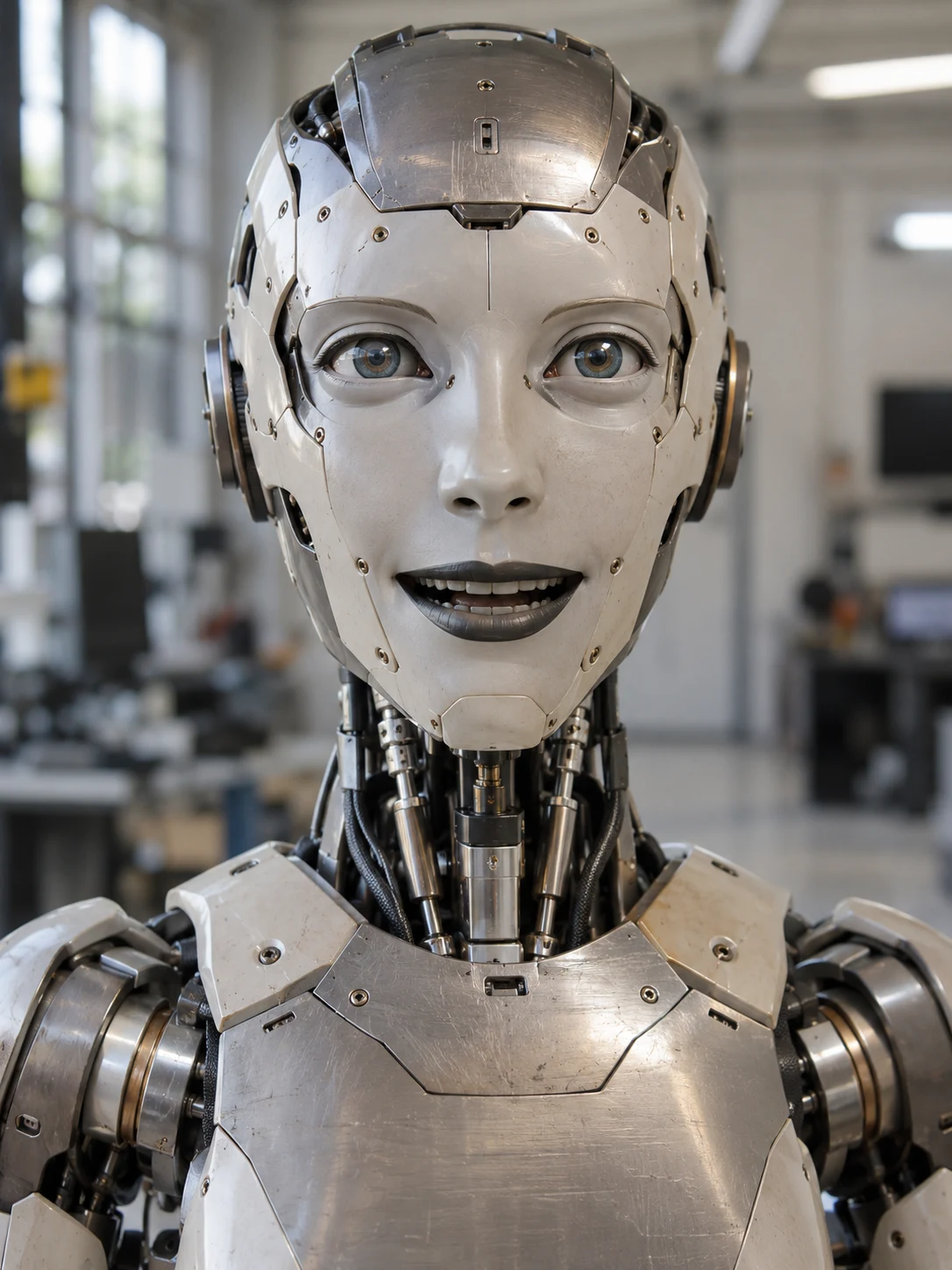
The robot image was generated for this task. It is an imagined physical robot, not a photograph of a person.
Natural recorded speech: The Tale of Peter Rabbit, read by Kevin Devine for LibriVox, by Beatrix Potter. Public domain. Source seconds 24.8–30.05, converted to mono 24 kHz PCM WAV. No text-to-speech input.
Prompt and settings used for this example
FastH3 OmniRef; eight steps, Euler/simple, sigma shifts 12/3, VSA 10%. 3:4 portrait at 1 MP; six-second duration control, 24 fps. Seed 402832748317658. Saved output: 896 × 1184, 158 frames, 6.583 seconds. Load Audio was added to the working copy and connected to the standalone audio-reference socket with the audio VAE. The downloadable base graph leaves this socket unconnected.
subject_definitions:
<Subject 1> is the physical humanoid robot in <Picture 1>: an ivory ceramic face assembled from separate panels with visible screws, a scratched brushed-metal cranial plate, blue optical eyes, dark articulated metallic lips and jaw, exposed polished neck pistons, cables and shoulder bearings. <Picture 1> supplies robot identity, materials and workshop appearance, not a timed first frame. <Audio 1> is the natural recorded male narration reference for the robot's vocal timbre, relaxed cadence and clear English pronunciation.

summary:
[reference generation] A photorealistic close-up of the same physical robot speaking one complete sentence directly to camera in its softly blurred workshop. The robot's articulated mouth moves with the speech, with restrained head and eye movement. Use <Audio 1> as a voice and delivery reference while generating the performance and soundtrack.

retention_analysis:
<Picture 1>: fully_preserved mechanical identity, ivory facial plates, brushed metal, blue optical eyes, visible fasteners, exposed neck actuators and shoulders; partially_preserved workshop background and close portrait framing.
<Audio 1>: attribute_transfer natural male vocal timbre, unhurried reading cadence and intelligible pronunciation; the reference is audio conditioning rather than an externally dubbed soundtrack.

detailed_description:
Photoreal live-action footage of a physically manufactured robot, with believable optical reflections, mechanical tolerances and weight. Soft workshop daylight reveals small scratches, ceramic edges and brushed-metal grain without stylization.
[Shot 1] The continuous six-second shot opens on <Subject 1>, centered from upper chest to above the cranial plate, facing the camera at eye level. Its ivory ceramic cheeks and forehead retain their panel seams and recessed screws, the exposed neck cylinders remain aligned with the chest, and the blue optical eyes maintain a calm direct gaze. The same softly defocused workshop from <Picture 1> remains behind it, with bright windows on the left and neutral industrial equipment in the distance. The camera stays locked, with no zoom or cut.
The robot begins speaking promptly in the natural male reading voice referenced by <Audio 1>. (S1) <d>[English] They lived with their mother in a sandbank, underneath the root of a very big fir-tree.</d> Deliver the complete sentence clearly at the reference's relaxed but fluent pace, preserving the short pause after sandbank and finishing before the shot ends. The lower jaw pivots subtly on its mechanical joint, and the dark segmented lips articulate small, precise speech shapes while the ceramic cheek plates retain their rigid form. Keep all teeth and mouth components spatially consistent as the mouth opens and closes. A slight head inclination accompanies the middle of the sentence; the neck pistons move only enough to support that small gesture. One brief eyelid movement and tiny eye adjustment add an attentive physical presence. After the final word, the jaw settles and the robot holds its gaze for the remaining moment. Keep the robot clearly mechanical throughout, with no human skin, beard, morphing face, extra subject, subtitle or on-screen text.

overall_soundscape:
One clear natural male speaking voice (S1), conditioned by <Audio 1>, close and dry, with the full quoted sentence audible above very quiet workshop room tone. No electronic voice filter, exaggerated robotic effect, competing speech, music or loud mechanical noise.

non_diegetic_music:
N/A
Observed limits: This single example does not establish voice fidelity or precise lip synchronization. Mild surface softening; sampled frames are not a frame-by-frame playback review.
The featured image documents the workflow graph. The output example above comes from a separate completed run, with its recorded prompt and limitations.
Download and load the workflow
Drag the downloaded JSON file onto the ComfyUI canvas to load it.
Install the model files and any custom nodes listed below. If the workflow uses input images, video or audio, select your own files in the input nodes before running it.
Which files go where
Place each file under your ComfyUI directory in the folder shown. A text encoder turns the prompt into model conditioning. A VAE decodes the sampled representation into image or audio data. A LoRA is an adapter loaded alongside the base model.
| Part | File | Size | Folder |
|---|---|---|---|
| vae | minimax_h3_video_vae_int8_convrot.safetensors | 2.81 GB | models/vae |
| vae | minimax_h3_audio_vae_fp32.safetensors | 0.61 GB | models/vae |
| diffusion_models | fasth3_omniref_8step_pruned_int8_convrot.safetensors | 22.21 GB | models/diffusion_models |
| text_encoders | qwen3vl_32b_minimax_h3_nvfp4_awq.safetensors | 15.69 GB | models/text_encoders |
The listed files total about 41.32 GB on disk. Disk size is not a measured VRAM requirement. Reuse matching files already installed rather than downloading a second copy.
Settings in this workflow
| Control | Saved value |
|---|---|
| Steps | 8 |
| Sampler / scheduler | euler / simple |
| Video / audio shift | 12 / 3 |
| Sparse attention | vsa, keep_percent 10 |
| Dense fallback | comfy kitchen attention |
| Duration / frame rate | 5 seconds / 24 fps |
| Reference node | 1344 × 768, 124 frames, match |
How to use it
- Load your reference into Load Image. The saved graph has one connected image.
- Write a prompt referring to <Picture 1>, then describe the shot, motion and audio.
- Keep VSA attention enabled and retain the 12 / 3 video and audio shift.
- Set duration and resolution, then generate when ready and inspect Save Video.
What to check before changing the graph
The workflow notes require VSA with keep_percent 10. Do not replace it with plain block-sparse attention, sol-attn or sla. The dense backend selector controls the fallback; it does not replace VSA. The notes describe up to nine reference images and optional video or audio references, but this saved graph connects one image. The note mentioning two wired images does not match the saved connections. Obtain consent before using a person’s face or voice.
Licence
The repositories list MiniMax H3 Community License Agreement. This is a community licence with conditions. Read the current terms before commercial use; a public download does not mean unrestricted use. See our model licence tracker for the wider collection.
Troubleshooting
| Problem | Likely cause | Fix |
|---|---|---|
| Missing nodes | Your installation differs from the captured environment | Update ComfyUI and reload the template before reconnecting nodes. |
| Model missing from a dropdown | File is in the wrong folder or the list is stale | Check the exact filename and folder above, then refresh the model list. |
| Unexpected output size or length | A connected input overrides an internal widget | Trace the size and duration connections from the outer graph. |
Where to go next
FAQ
Are these output examples?
The featured image shows the workflow graph. The Output example section shows the actual saved generation from a PC with an RTX 3090.
Can I change the saved settings?
Yes. Keep the documented configuration as a reference and change one control at a time. Samplers, adapters and noise schedules work together, so treat a replacement recipe as a separate configuration.
Sources
- Comfy-Org/MiniMax-H3: model files and repository licence metadata.
- FastVideo/FastH3-OmniRef-Comfy: model files and repository licence metadata.