
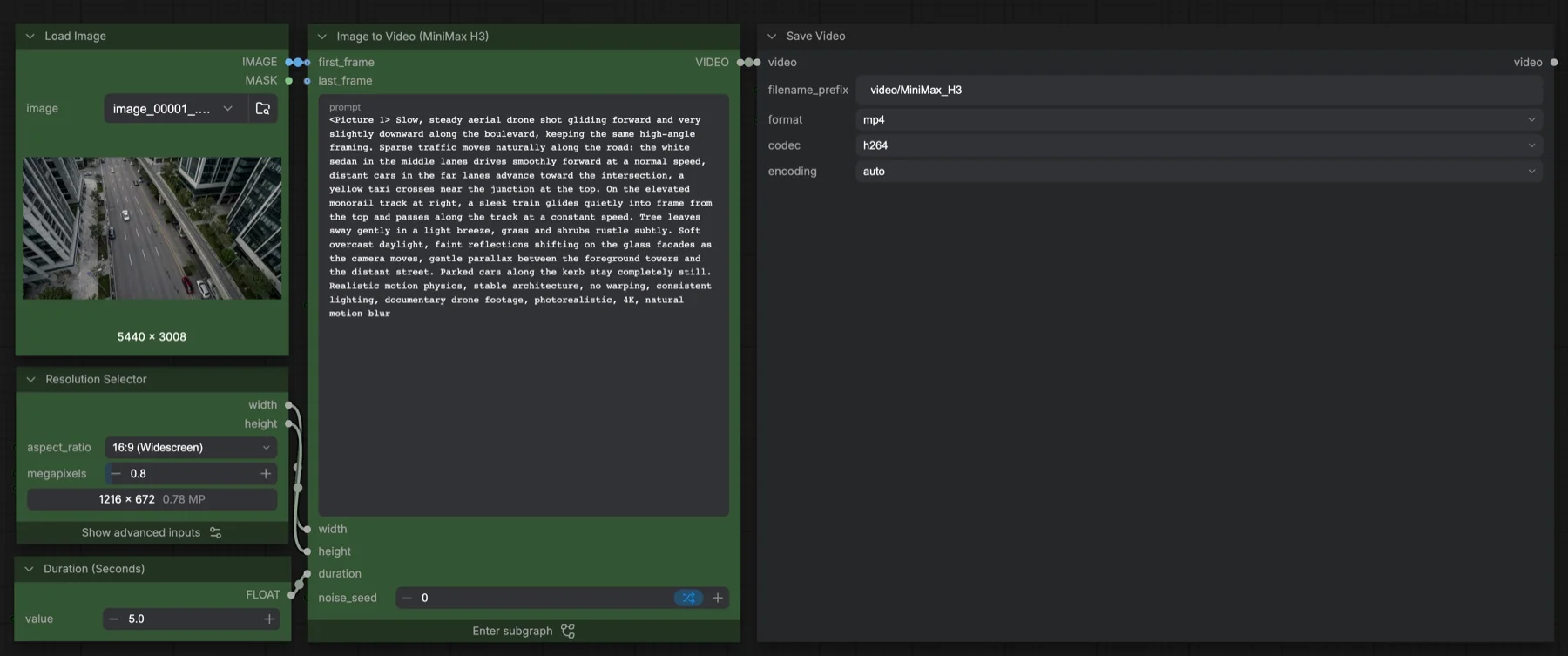
Short answer: this built-in ComfyUI template turns one starting image and a prompt into a short MP4 clip with sound, using MiniMax H3's fl2va diffusion model. It samples 20 steps with the res_multistep sampler and the simple scheduler, at 1216 × 672, 24 fps, for 5 seconds by default. The four files it loads total about 42.5 GB. The weights use the MiniMax H3 Community License Agreement, which has conditions.
Output example
This workflow was run on a PC with an RTX 3090. We downloaded the saved output and inspected sampled video frames. It is one prompt and seed, not a general quality benchmark.
Audio stream checks confirm technical presence only. We have not verified sound quality, speech accuracy or lip sync by listening.
Input references

Original synthetic Pika H3 Flex scene generated in this batch. FFmpeg extraction of first decoded frame; no real identity, logo or external source recording.
Prompt used for this example
For the target video, at 0.00 seconds into the target video, <Picture 1> (from [Shot 1]) is fully referenced.

integrated_multimodal_description: [Shot 1] Photorealistic macro product cinematography of the cobalt-blue ceramic tea cup on a walnut table beside a rainy window. A thin plume of steam rises from the cobalt-blue cup, bends toward the rainy window and unwinds into two delicate wisps. The camera slowly pushes in with small amplitude, finishing on the glossy cup rim and fine vapor. The cup remains planted on the tabletop, its handle and rim keep the same shape, and no liquid spills. Preserve the framing relationship and warm lighting of the source. End with the camera still moving very gently. One continuous shot, no cuts, no people or lettering.

overall_soundscape: Rain tapping gently on window glass, quiet indoor room tone and faint distant street noise. No speech.

non_diegetic_music: N/A
Observed limits: One fixture does not exercise optional inputs or establish general reliability. Audio stream presence does not establish speech accuracy, sound quality or lip sync.
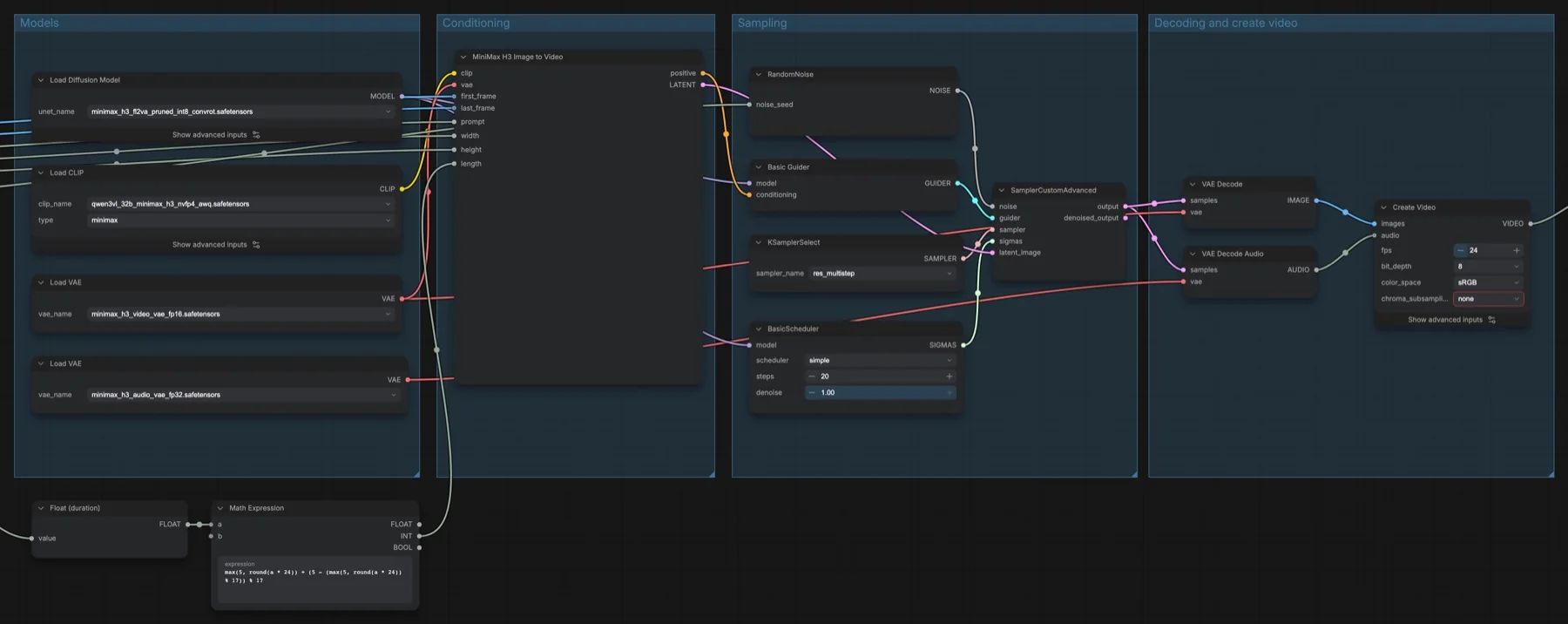
Download and load the workflow
Drag the downloaded JSON file onto the ComfyUI canvas to load it.
Install the model files and any custom nodes listed below. If the workflow uses input images, video or audio, select your own files in the input nodes before running it.
Which files go where
All four files come from the Comfy-Org/MiniMax-H3 repository. It is not gated, so you can download without signing in.
| Part | File | Size | Folder |
|---|---|---|---|
| Diffusion model | minimax_h3_fl2va_pruned_int8_convrot.safetensors | 20.97 GB | models/diffusion_models |
| Text encoder | qwen3vl_32b_minimax_h3_nvfp4_awq.safetensors | 15.69 GB | models/text_encoders |
| Video VAE | minimax_h3_video_vae_fp16.safetensors | 5.21 GB | models/vae |
| Audio VAE | minimax_h3_audio_vae_fp32.safetensors | 0.61 GB | models/vae |
Total: about 42.5 GB. No custom node packs are needed. In Load CLIP, keep the type set to minimax.
Settings in this workflow
| Setting | Value |
|---|---|
| Sampler | res_multistep |
| Scheduler | simple, 20 steps, denoise 1.00 |
| Guider | Basic Guider (one prompt, no CFG value to set) |
| Resolution | 16:9 at 0.8 megapixels, multiple of 32 (1216 × 672) |
| Duration | 5 seconds (124 frames after the Math Expression node) |
| Frame rate | 24 fps, 8-bit, sRGB |
| Output | MP4, H.264, prefix video/MiniMax_H3 |
| Seed | Randomised after each run |
The Math Expression node rounds your duration to a frame count the model accepts. Its formula is max(5, round(a * 24)) + (5 - (max(5, round(a * 24)) % 17)) % 17, so frame counts always land on 5 more than a multiple of 17.
How to use it
- In Load Image, choose your starting picture.
- In Resolution Selector, pick the aspect ratio and megapixels. Match the shape of your picture.
- Set Duration (Seconds).
- In the subgraph's prompt box, start with
<Picture 1>, then describe the camera move, what moves in the scene and the sound you want. - Run the workflow. Save Video writes an MP4 with the audio track.
Prompting for motion and sound
The template description says MiniMax H3 makes the picture and the matching audio in one pass. So describe both. The sample prompt is a good pattern: one camera move ("slow, steady aerial drone shot"), named objects and how each one moves, what stays still ("parked cars stay completely still"), then light and style. The subgraph also has a last_frame input. Connect a second Load Image there if you want the clip to end on a set picture.
Licence
The Comfy-Org/MiniMax-H3 repository lists the MiniMax H3 Community License Agreement. This is not Apache-2.0 or MIT. It has conditions, so read it before you use the model or its output commercially. Our licence tracker compares the current open image and video models.
Troubleshooting
| Problem | Likely cause | Fix |
|---|---|---|
| MiniMax H3 Image to Video node is missing | ComfyUI is out of date | Update ComfyUI and restart. |
| Text encoder fails to load | Load CLIP type is wrong | Set the type to minimax. |
| Video has no sound | The audio VAE is missing or VAE Decode Audio is disconnected | Download the audio VAE and check that Create Video receives audio. |
| Out-of-memory error | Resolution or duration is too high | Lower the megapixels in Resolution Selector or shorten the duration. |
| Clip ignores your picture | The prompt does not refer to it | Start the prompt with <Picture 1>. |
Where to go next
- Want fewer steps? See MiniMax H3 Turbo image to video.
- Need a character or voice to stay consistent? Read MiniMax H3 reference to video.
- Want several images at set times? Try MiniMax H3 multi-keyframe video.
- Compare with LTX-2.3 image to video.
FAQ
Does MiniMax H3 make the audio too?
Yes. The sampler produces one combined result. VAE Decode makes the frames, VAE Decode Audio makes the sound, and Create Video joins them.
Can I use the reference-to-video model file here?
No. Image to video uses the fl2va model. The reference workflows use a separate ref2va file of the same size.
Can I use MiniMax H3 commercially?
Only within the terms of the MiniMax H3 Community License Agreement. Read it first.
Sources
- Comfy-Org/MiniMax-H3 on Hugging Face: ComfyUI weight files, sizes and licence
- MiniMax H3 announcement: the model and its joint video and audio output
- ComfyUI pull request #15224: MiniMax H3 support in ComfyUI