
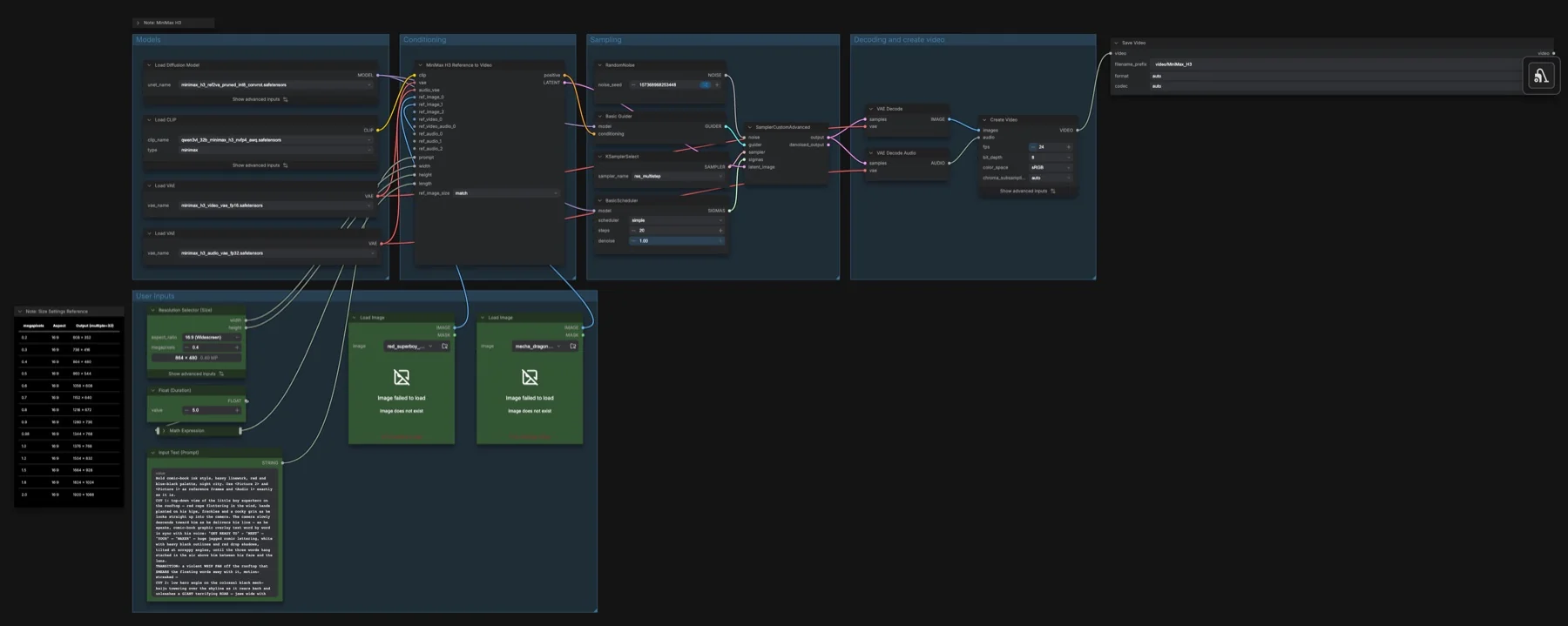
Short answer: this built-in template feeds MiniMax H3 reference images (and, if you add them, videos and audio) plus a prompt, and makes a new MP4 clip with sound. It uses the ref2va diffusion model, 20 steps with res_multistep and the simple scheduler, 864 × 480, 24 fps and 5 seconds. The four files total about 42.5 GB. The licence is the MiniMax H3 Community License Agreement, which has conditions.
Output example
This workflow was run on a PC with an RTX 3090. We downloaded the saved output and inspected sampled video frames. It is one prompt and seed, not a general quality benchmark.
Audio stream checks confirm technical presence only. We have not verified sound quality, speech accuracy or lip sync by listening.
Input references

Original procedural illustration authored for this run. Original Pillow drawing, 720x1280. Fictional robot; no real face or identity used. Creation source: setup.py.
James Wheeler · Source licence. Centered 16:9 crop, Lanczos resize to 1280x720, JPEG quality 95. control.mp4: deterministic 10-second FFmpeg slow zoom/pan at 25 fps, 1280x704; anchors extracted at 0, 1.5, 3 and 8 seconds.
Prompt used for this example
subject_definitions:
<Subject 1> is the small friendly illustrated robot in <Picture 1>, with a round cream head, dark teal faceplate, two mint circular eyes, orange ear pads and body, a glowing mint antenna and a simple smiling mouth. Reference role: character appearance and palette.
<Subject 2> is the lake and mountain environment in <Picture 2>, with turquoise water, evergreen forest and warm orange peaks. Reference role: environment geography and lighting.

summary:
[reference generation] A short character animation that preserves the reference design while creating a new continuous scene.

retention_analysis:
<Picture 1>: fully_preserved robot design, cream head, teal faceplate and orange body.
<Picture 2>: partially_preserved lake environment and sunset palette, adapted as an illustrated background.

detailed_description:
[Shot 1] Polished editorial 2D character animation with soft dimensional shading, clean silhouettes and restrained motion. The robot stands on a small rocky overlook beside the turquoise mountain lake, lifts its right hand in one small welcoming wave, lowers it, then looks toward the sunlit peaks. The camera slowly trucks right with small amplitude, revealing parallax between the robot and distant mountains. The round head retains its shape, both eyes stay evenly spaced, and the orange body remains solid. The smiling mouth stays closed; there is no dialogue. Keep the robot as one consistent character, with no duplicates or extra limbs. End on a readable relaxed pose. One uninterrupted shot without cuts or lettering.

overall_soundscape:
Soft wind, gentle lake water and a tiny friendly electronic chirp during the wave.

non_diegetic_music:
N/A
Observed limits: One fixture does not exercise optional inputs or establish general reliability. Audio stream presence does not establish speech accuracy, sound quality or lip sync.
Download and load the workflow
Drag the downloaded JSON file onto the ComfyUI canvas to load it.
Install the model files and any custom nodes listed below. If the workflow uses input images, video or audio, select your own files in the input nodes before running it.
Which files go where
All files come from Comfy-Org/MiniMax-H3, which is not gated.
| Part | File | Size | Folder |
|---|---|---|---|
| Diffusion model | minimax_h3_ref2va_pruned_int8_convrot.safetensors | 20.97 GB | models/diffusion_models |
| Text encoder | qwen3vl_32b_minimax_h3_nvfp4_awq.safetensors | 15.69 GB | models/text_encoders |
| Video VAE | minimax_h3_video_vae_fp16.safetensors | 5.21 GB | models/vae |
| Audio VAE | minimax_h3_audio_vae_fp32.safetensors | 0.61 GB | models/vae |
Total: about 42.5 GB. No custom node packs are needed. The workflow notes point out that ref2va is a different set of weights from the fl2va model in the text-to-video and image-to-video templates, so you need it even if you already have fl2va.
Settings in this workflow
| Setting | Value |
|---|---|
| Sampler | res_multistep |
| Scheduler | simple, 20 steps, denoise 1.00 |
| Guider | Basic Guider (no CFG value) |
| Resolution | 16:9 at 0.4 megapixels, multiple of 32 (864 × 480) |
| Duration | 5 seconds (124 frames) |
| ref_image_size | match |
| Frame rate | 24 fps, 8-bit, sRGB |
| Seed | Randomised after each run |
The size note runs from 0.2 megapixels (608 × 352) to 2.0 megapixels (1920 × 1088). The value 0.98 gives 1344 × 768.
How to use it
- Load your reference pictures into the two Load Image nodes. They connect to the first two image slots of MiniMax H3 Reference to Video.
- To add more, connect extra images, videos or audio to the node's
ref_images,ref_videos,ref_video_audiosandref_audiosslots. The notes give the limits: 9 images, 3 videos (each can carry its own soundtrack) and 3 separate audio clips. - Write the prompt in Input Text (Prompt). Refer to each input by tag, in the order you connected it:
<Picture 1>,<Video 1>,<Audio 1>. Then describe the scene, the motion and the sound. - Set the size and Float (Duration), then run.
Tips from the workflow notes
- Be exact with tags. The notes say results are very sensitive to prompt wording. Say which reference drives which part of the shot.
- Identity versus speed.
matchscales references down to the output size, which is faster.maxkeeps up to a 2048 px short edge for stronger identity, but it is slower, because reference data goes through every sampling step. - Try another scheduler. The notes say
betaornormaltend to beatsimplefor prompts with many references. - Check the sample prompt. It mentions
<Audio 1>, but the template has no audio input connected. Add a Load Audio node toref_audios, or remove that tag.
If a reference shows a real person's face or voice, you need that person's consent, and you must follow the licence's use rules.
Licence
The Comfy-Org/MiniMax-H3 repository lists the MiniMax H3 Community License Agreement. It has conditions, so read it before commercial use. Our licence tracker compares the alternatives.
Troubleshooting
| Problem | Likely cause | Fix |
|---|---|---|
| MiniMax H3 Reference to Video node is missing | ComfyUI is out of date | Update ComfyUI and restart. |
| Load Image shows "Image does not exist" | The sample pictures are not on your machine | Load your own images. |
| A reference is ignored | Tag order does not match the connection order | Number tags in the order the inputs are connected. |
| Identity drifts | ref_image_size is match | Switch to max and expect slower runs. |
| Out-of-memory or very slow runs | max sizing or a high megapixel value | Use match and a lower megapixel value. |
Where to go next
- Pin images to set times: MiniMax H3 multi-keyframe video.
- Make a speaking clip from a photo and a voice: MiniMax H3 talking avatar.
- Compare with FastH3 OmniRef reference to video.
FAQ
How many references can MiniMax H3 take?
The workflow notes say up to 9 images, 3 videos and 3 standalone audio clips.
How long can the clip be?
The notes say up to about 15 seconds at 24 fps and up to 2K resolution. The template is set to 5 seconds.
Does it make sound?
Yes. The notes say voice, sound effects and music are generated together with the picture, in one pass.
Sources
- MiniMax H3 announcement: the model, stereo audio, length and resolution limits
- ComfyUI pull request #15224: MiniMax H3 support in ComfyUI
- Comfy-Org/MiniMax-H3: weight files and licence