
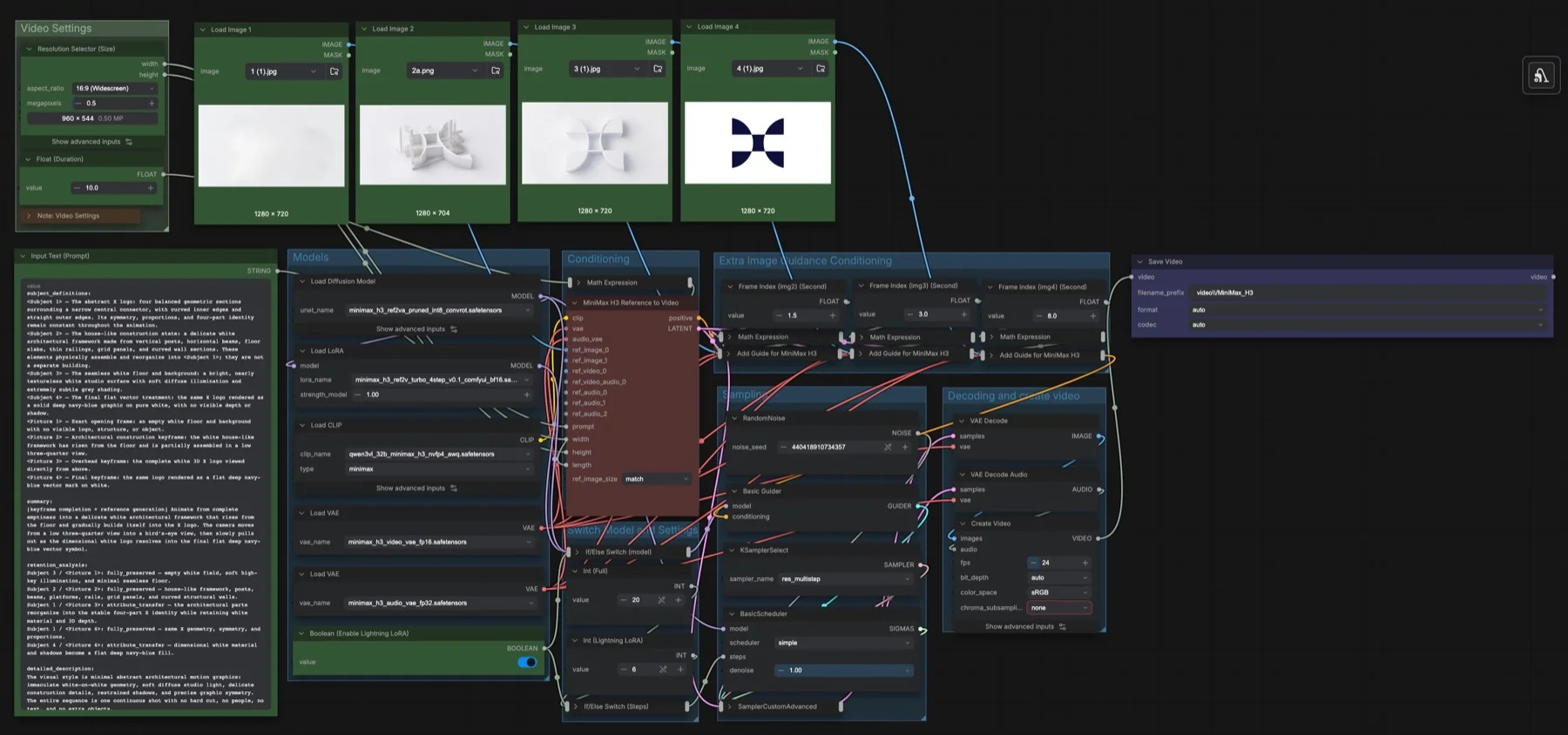
Short answer: this is our own MiniMax H3 build. It starts from the Reference to Video template and adds three Add Guide for MiniMax H3 nodes, so four images appear at set times: the start, 1.5 s, 3 s and 8 s of a 10-second clip. A switch turns on a Lightning LoRA and drops sampling from 20 to 6 steps. Resolution is 960 × 544 at 24 fps. The five files total about 44.4 GB. The licence is the MiniMax H3 Community License Agreement, which has conditions.
Output example
This workflow was run on a PC with an RTX 3090. We downloaded the saved output and inspected sampled video frames. It is one prompt and seed, not a general quality benchmark.
Audio stream checks confirm technical presence only. We have not verified sound quality, speech accuracy or lip sync by listening.
Input references
James Wheeler · Source licence. Centered 16:9 crop, Lanczos resize to 1280x720, JPEG quality 95. control.mp4: deterministic 10-second FFmpeg slow zoom/pan at 25 fps, 1280x704; anchors extracted at 0, 1.5, 3 and 8 seconds.
Prompt used for this example
subject_definitions:
<Subject 1> is the turquoise lake, evergreen shore and orange-lit mountain wall in all four pictures. <Picture 1> is the opening composition; <Picture 2> is the 1.5-second guide; <Picture 3> is the 3-second guide; <Picture 4> is the 8-second guide.

summary:
[keyframe completion + reference generation] A continuous ten-second scenic camera move through four progressively closer landscape anchors.

retention_analysis:
<Picture 1>: fully_preserved opening geography and lighting.
<Picture 2>: fully_preserved composition at 1.5 seconds.
<Picture 3>: fully_preserved composition at 3 seconds.
<Picture 4>: fully_preserved composition at 8 seconds.

detailed_description:
Photorealistic travel cinematography at the edge of a clear alpine lake at sunset. [Shot 1] Begin from <Picture 1>, looking across turquoise water toward the sharply layered grey mountain wall and the dense evergreen shoreline to the right. The camera begins a very slow smooth forward push, maintaining the same level horizon and warm orange light across the upper peaks. Small surface ripples gently break the reflection while the rocks and trees retain their shapes. At 00:01.500 pass through the slightly closer composition of <Picture 2> without a cut. Continue drifting forward at the same gentle speed, arriving at <Picture 3> at 00:03.000; the near shoreline shifts very slightly relative to the distant mountains. Keep the small colored canoes at the right shore in their original position. From three to eight seconds, sustain the forward camera motion rather than freezing the image; reflection movement remains subtle and geographically consistent. At 00:08.000 reach <Picture 4>, with its closer view of the mountain wall and evergreen shoreline. Ease the camera gradually to a calm hold over the final two seconds. Preserve the water color, cloud cover and illumination throughout. No added people, boats, buildings, text or transitions.

overall_soundscape:
Quiet water lapping at stones with soft wind through distant pine trees; no voices.

non_diegetic_music:
N/A
Observed limits: One fixture does not exercise optional inputs or establish general reliability. Audio stream presence does not establish speech accuracy, sound quality or lip sync.
Download and load the workflow
Drag the downloaded JSON file onto the ComfyUI canvas to load it.
Install the model files and any custom nodes listed below. If the workflow uses input images, video or audio, select your own files in the input nodes before running it.
Which files go where
| Part | File | Size | Folder |
|---|---|---|---|
| Diffusion model | minimax_h3_ref2va_pruned_int8_convrot.safetensors | 20.97 GB | models/diffusion_models |
| Text encoder | qwen3vl_32b_minimax_h3_nvfp4_awq.safetensors | 15.69 GB | models/text_encoders |
| Lightning LoRA | minimax_h3_ref2v_turbo_4step_v0.1_comfyui_bf16.safetensors | 1.96 GB | models/loras |
| Video VAE | minimax_h3_video_vae_fp16.safetensors | 5.21 GB | models/vae |
| Audio VAE | minimax_h3_audio_vae_fp32.safetensors | 0.61 GB | models/vae |
Total: about 44.4 GB, all from Comfy-Org/MiniMax-H3, which is not gated. A LoRA is a small add-on file that changes how the main model behaves; you can skip this one if you leave the switch off.
Settings in this workflow
| Setting | Value |
|---|---|
| Enable Lightning LoRA | On (LoRA strength 1) |
| Steps | 6 with the LoRA, 20 without |
| Sampler / scheduler | res_multistep / simple, denoise 1.00 |
| Keyframe times | Image 1 at the start; images 2, 3 and 4 at 1.5 s, 3 s and 8 s (frames 36, 72 and 192) |
| Duration | 10 seconds (243 frames) |
| Resolution | 16:9 at 0.5 megapixels (960 × 544) |
| ref_image_size | match |
| Frame rate / seed | 24 fps / fixed seed |
How to use it
- Load your opening frame into Load Image 1 and the later keyframes into Load Image 2, 3 and 4.
- Set each Frame Index (Second) value to when that image should appear.
- Set Float (Duration) longer than your last keyframe time.
- Describe the whole shot in Input Text (Prompt), naming the images as
<Picture 1>to<Picture 4>, plus the sound and music. - Choose the LoRA switch, then run.
Tips from the workflow notes
- Lightning LoRA: the note says it makes video fast, but the quality is lower. Use it for drafts and turn it off for the final run.
- Duration: the note says up to 15 seconds.
- Manual size: delete the Resolution Selector if you want to type the width and height yourself. The note says 0.98 megapixels gives 1344 × 768, the official 768p size.
- Keep times in sync: the sample prompt describes keyframes at 2, 4 and 6 seconds, but the guide nodes are set to 1.5, 3 and 8. Make the prompt and the Frame Index values match.
Licence
The Comfy-Org/MiniMax-H3 repository, including the LoRA, lists the MiniMax H3 Community License Agreement. It has conditions: read it before commercial use. See our licence tracker.
Troubleshooting
| Problem | Likely cause | Fix |
|---|---|---|
| Add Guide for MiniMax H3 is missing | ComfyUI is out of date | Update ComfyUI and restart. |
| A keyframe never appears | Its time is later than the duration | Raise Float (Duration) or lower the Frame Index. |
| LoRA file not found | The LoRA is not in models/loras | Download it, or delete the LoRA branch and the switches. |
| Draft looks rough | Lightning LoRA is on | Set Enable Lightning LoRA to off for 20 steps. |
| Out-of-memory error | Resolution or duration is too high | Lower the megapixels or the duration. |
Where to go next
- The template this is built on: MiniMax H3 reference to video.
- Start and end frames only: MiniMax H3 image to video.
- Structure from a depth map instead: LTX-2.3 depth control video.
FAQ
Is this an official ComfyUI template?
No. It is our build on top of MiniMax H3: Reference to Video, using the core Add Guide for MiniMax H3 node.
Can I add more than four keyframes?
Yes. Chain another Add Guide node with its own image, Float and Math Expression.
Why is the LoRA called 4-step when the workflow uses 6?
That is the setting in our build. The file name describes the LoRA; the Int (Lightning LoRA) node sets 6 steps. You can change it.
Sources
- Comfy-Org/MiniMax-H3: model, LoRA, VAEs, text encoder and licence
- MiniMax H3 announcement: the model and its joint audio and video output
- ComfyUI pull request #15224: MiniMax H3 support in ComfyUI