
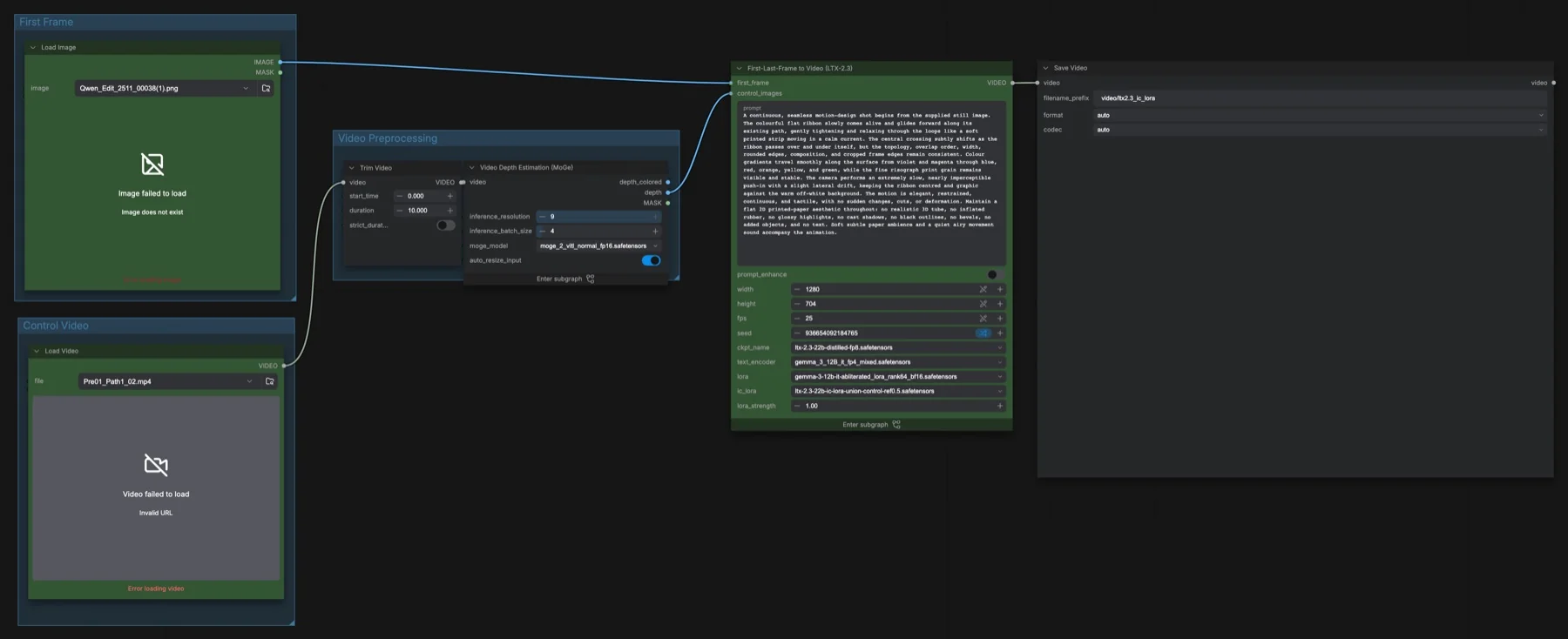
Short answer: This workflow animates one still image (the first frame) so that the motion and layout follow a control video. MoGe, a depth estimation model, turns the control video into depth frames. Those frames guide the ltx-2.3-22b-distilled-fp8 checkpoint through the LTX-2.3 IC-LoRA Union Control at strength 1. It samples once: 8 steps, CFG 1, euler_ancestral, linear_quadratic, at 1280 × 704 and 25 fps. The files total about 41 GB. LTX-2.3 uses the LTX-2 community licence (it has conditions); MoGe is MIT.
Output example
This workflow was run on a PC with an RTX 3090. We downloaded the saved output and inspected sampled video frames. It is one prompt and seed, not a general quality benchmark.
Audio stream checks confirm technical presence only. We have not verified sound quality, speech accuracy or lip sync by listening.
Input references
James Wheeler · Source licence. Centered 16:9 crop, Lanczos resize to 1280x720, JPEG quality 95. control.mp4: deterministic 10-second FFmpeg slow zoom/pan at 25 fps, 1280x704; anchors extracted at 0, 1.5, 3 and 8 seconds.
Prompt used for this example
Use the provided start image as the first frame. Follow the source control clip's slow forward camera push across this turquoise alpine lake. Preserve the orange-lit mountain ridge, the evergreen shoreline to the right and the small canoes beside the shore. Keep the camera level and match the gradual change in scale from the depth sequence, maintaining the foreground-water and distant-mountain depth order. Small natural ripples move across the reflection; trees and rocks stay rooted. One continuous ten-second shot, no cuts, no new subjects. Quiet lake water and light wind, no dialogue or music.Observed limits: One fixture does not exercise optional inputs or establish general reliability. Audio stream presence does not establish speech accuracy, sound quality or lip sync.
Download and load the workflow
Drag the downloaded JSON file onto the ComfyUI canvas to load it.
Install the model files and any custom nodes listed below. If the workflow uses input images, video or audio, select your own files in the input nodes before running it.
Which files go where
| Part | File | Size | Folder |
|---|---|---|---|
| Checkpoint (video, audio VAE) | ltx-2.3-22b-distilled-fp8.safetensors | 29.53 GB | models/checkpoints |
| Text encoder | gemma_3_12B_it_fp4_mixed.safetensors | 9.45 GB | models/text_encoders |
| IC-LoRA Union Control | ltx-2.3-22b-ic-lora-union-control-ref0.5.safetensors | 0.65 GB | models/loras |
| Prompt enhancer LoRA | gemma-3-12b-it-abliterated_lora_rank64_bf16.safetensors | 0.63 GB | models/loras |
| Depth model | moge_2_vitl_normal_fp16.safetensors | 0.66 GB | models/geometry_estimation |
The total is about 40.92 GB. No repository is gated and no custom node packs are needed. A LoRA is a small add-on file that changes a model's behaviour; an IC-LoRA is one that reads the guide frames you pass in with LTXVAddGuide.
Settings in this workflow
| Setting | Value |
|---|---|
| Control video | Trim Video from 0 for 10 seconds |
| MoGe | Resolution level 9, batch size 4, auto-resize above 2048 px on, depth output used |
| Output size and frame rate | 1280 × 704, 25 fps |
| Frame count | One frame per depth frame from the control video |
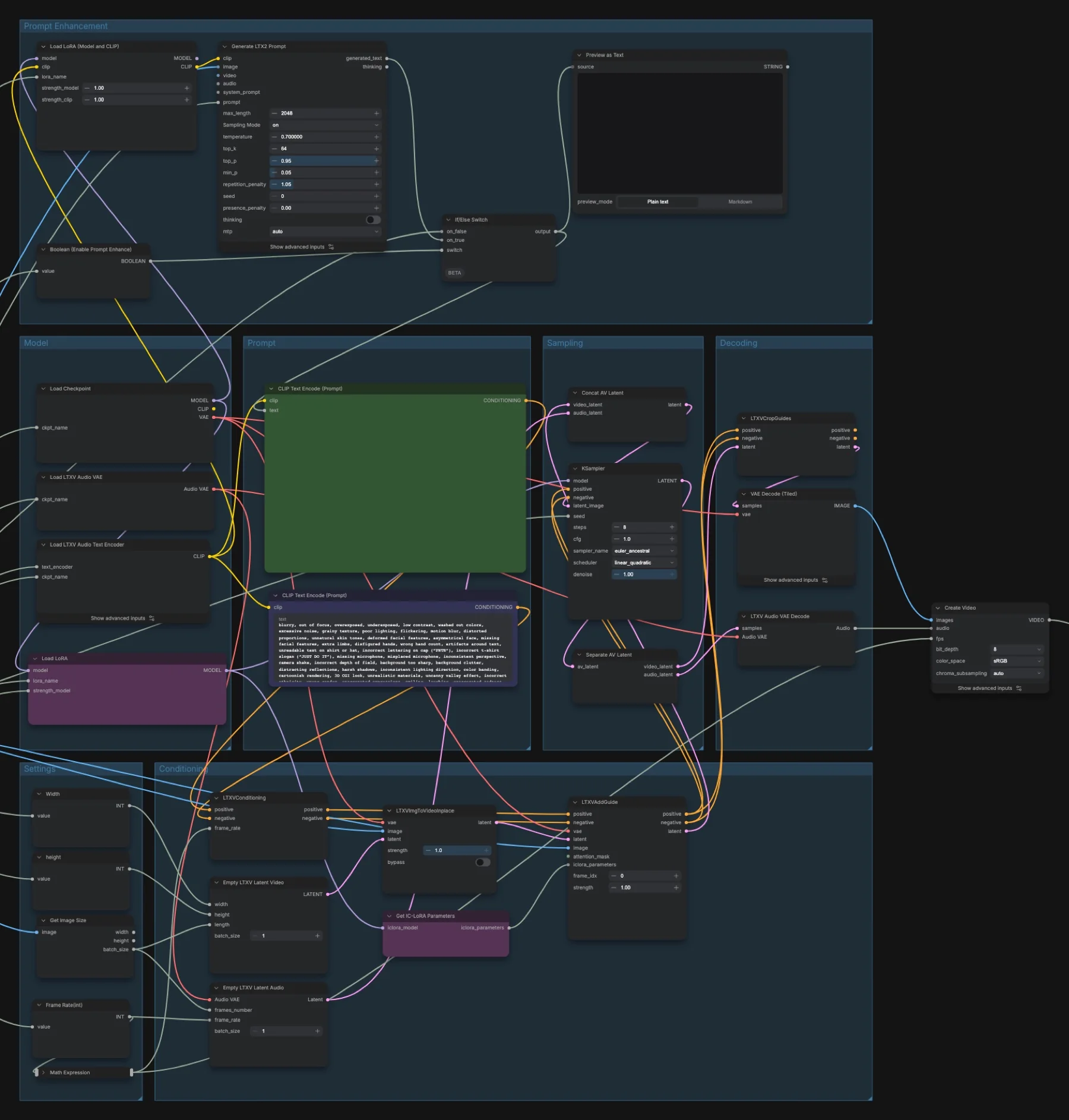
| KSampler | 8 steps, CFG 1, euler_ancestral, linear_quadratic, denoise 1 |
| IC-LoRA strength | 1 |
| Guide | LTXVAddGuide frame_idx 0, strength 1 |
| First-frame strength | 1 |
| Prompt enhance | Off |
CFG is how strongly the sampler pushes towards your prompt. The scheduler (linear_quadratic) sets how the noise level falls across the 8 steps.
How to use it
- Load your still image in the First Frame group.
- Load the clip whose motion you want in the Control Video group, and set the Trim Video start and duration.
- Write a prompt that describes the motion, camera and sound, matching the still image.
- Check width, height and fps on the LTX subgraph panel.
- Run the queue. Save Video uses the prefix
video/ltx2.3_ic_lora.
Tips for this build
- Frame rate: the output has one frame per control frame and plays at 25 fps. If your control clip has a different frame rate, the result runs longer or shorter than the clip.
- Negative prompt: the one in the Prompt group came from another example and mentions items such as a microphone and cap lettering. Replace it with one that fits your scene.
- Prompt enhancer: turning prompt_enhance on sends your prompt and the first frame to Generate LTX2 Prompt. It uses the Gemma 3 encoder with a community LoRA from Comfy-Org/ltx-2 that changes how Gemma responds. With it off, as shipped, your prompt goes straight to the standard
gemma_3_12B_it_fp4_mixedencoder.
Licence
Lightricks/LTX-2.3-fp8 and Comfy-Org/ltx-2 list the LTX-2 Community License Agreement, and the IC-LoRA repository lists the LTX-2 community licence. It has conditions, so read it before commercial use. The Comfy-Org/MoGe repository lists MIT, which allows commercial use, but the video model's licence still applies to the result. See our licence tracker.
Troubleshooting
| Problem | Likely cause | Fix |
|---|---|---|
| MoGe or LTXV nodes are missing | ComfyUI is out of date | Update ComfyUI and restart. The build uses core nodes only. |
| Load Video or Load Image shows an error | Our example files are not included | Load your own image and clip. |
| Out of memory during depth estimation | Too many frames per MoGe batch | Lower inference_batch_size on the MoGe subgraph. |
| Out of memory during sampling | The control clip gives too many frames | Shorten the Trim Video duration, or lower width and height. |
| The motion does not follow the control video | The IC-LoRA is not loaded or its strength is low | Check ic_lora and lora_strength (1) on the subgraph panel. |
Where to go next
- No control video? Start with LTX-2.3 image to video in ComfyUI.
- Depth control for stills: MOSS-Image colour and depth control.
- Background on structure control: our controllable diffusion project.
FAQ
Is this a built-in ComfyUI template?
No. It is our build on top of the LTX-2.3: FLF2V template, with the IC-LoRA Union Control and a MoGe depth subgraph added.
Does the output keep the length of my control video?
It keeps the number of frames. The frame count comes from the trimmed control clip, and the result plays at 25 fps.
Can I use the coloured depth view instead?
The MoGe subgraph also outputs a coloured depth view and a mask, but this build sends the plain depth output to the guide.
Sources
- Lightricks/LTX-2.3-fp8 on Hugging Face: distilled FP8 checkpoint, licence
- Lightricks/LTX-2.3-22b-IC-LoRA-Union-Control on Hugging Face: control LoRA
- Comfy-Org/ltx-2 on Hugging Face: Gemma 3 text encoder and prompt enhancer LoRA
- Comfy-Org/MoGe on Hugging Face: MoGe depth model, MIT licence