
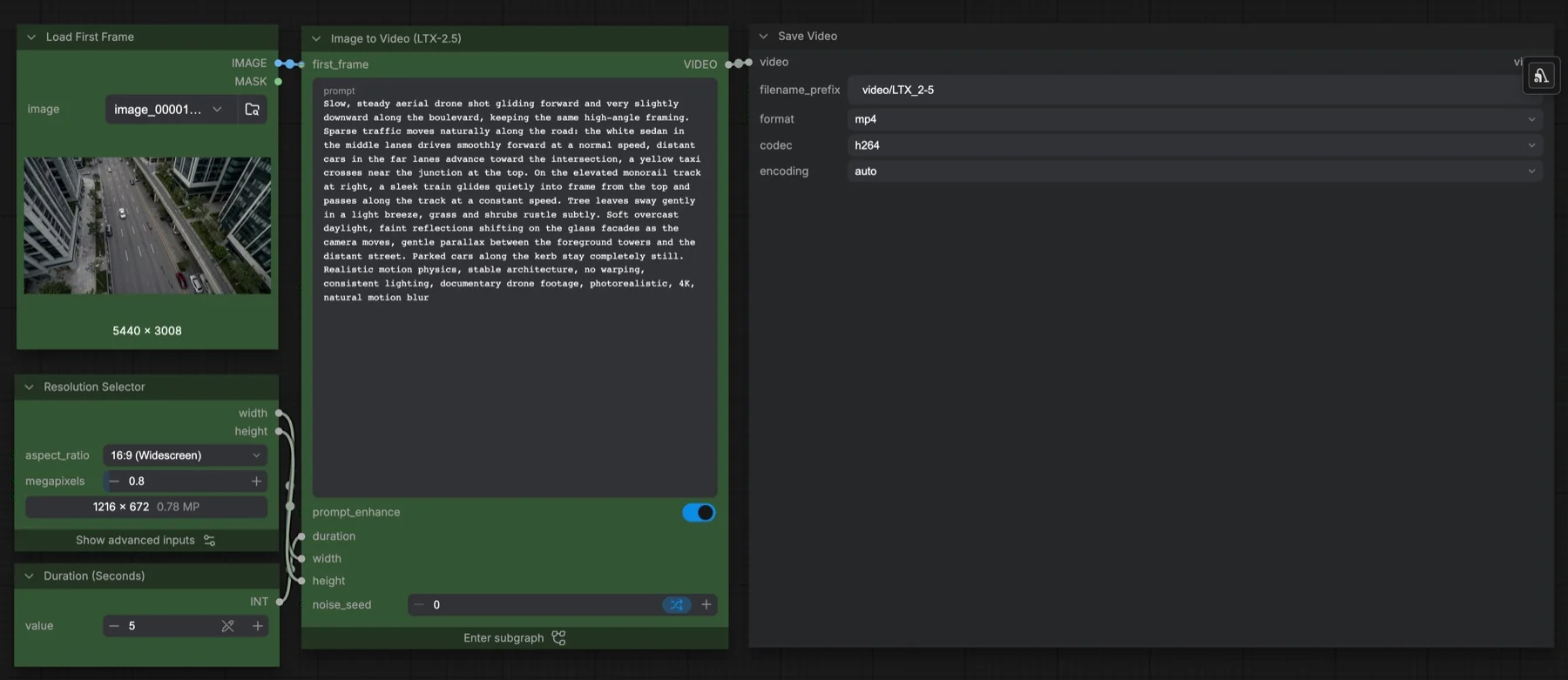
Short answer: Animate a first frame with LTX-2.5 and its two-stage latent sampling graph. The total download size is unconfirmed because the LTX-2.5 files require access. The repositories list LTX-2.x Community License Agreement.
Output example
This workflow was run on a PC with an RTX 3090. We downloaded the saved output and inspected sampled video frames. It is one prompt and seed, not a general quality benchmark.
Audio stream checks confirm technical presence only. We have not verified sound quality, speech accuracy or lip sync by listening.
Input references

Original synthetic Pika H3 Flex scene generated in this batch. FFmpeg extraction of first decoded frame; no real identity, logo or external source recording.
Prompt used for this example
Use the provided start image as the first frame. Preserve the cup, table, rain-streaked window and warm amber side lighting. A fresh raindrop slowly trails down the window behind the blue cup while steam curls above the hot tea. The camera slides very slowly to the right, keeping the cup rim in focus as the amber bokeh shifts softly behind it. The cup remains solid and still, with no spills. One continuous shot, no cuts or text. Soft rain on glass and quiet room ambience, no dialogue or music.Observed limits: One fixture does not exercise optional inputs or establish general reliability. Audio stream presence does not establish speech accuracy, sound quality or lip sync.
The featured image documents the workflow graph. The output example above comes from a separate completed run, with its recorded prompt and limitations.
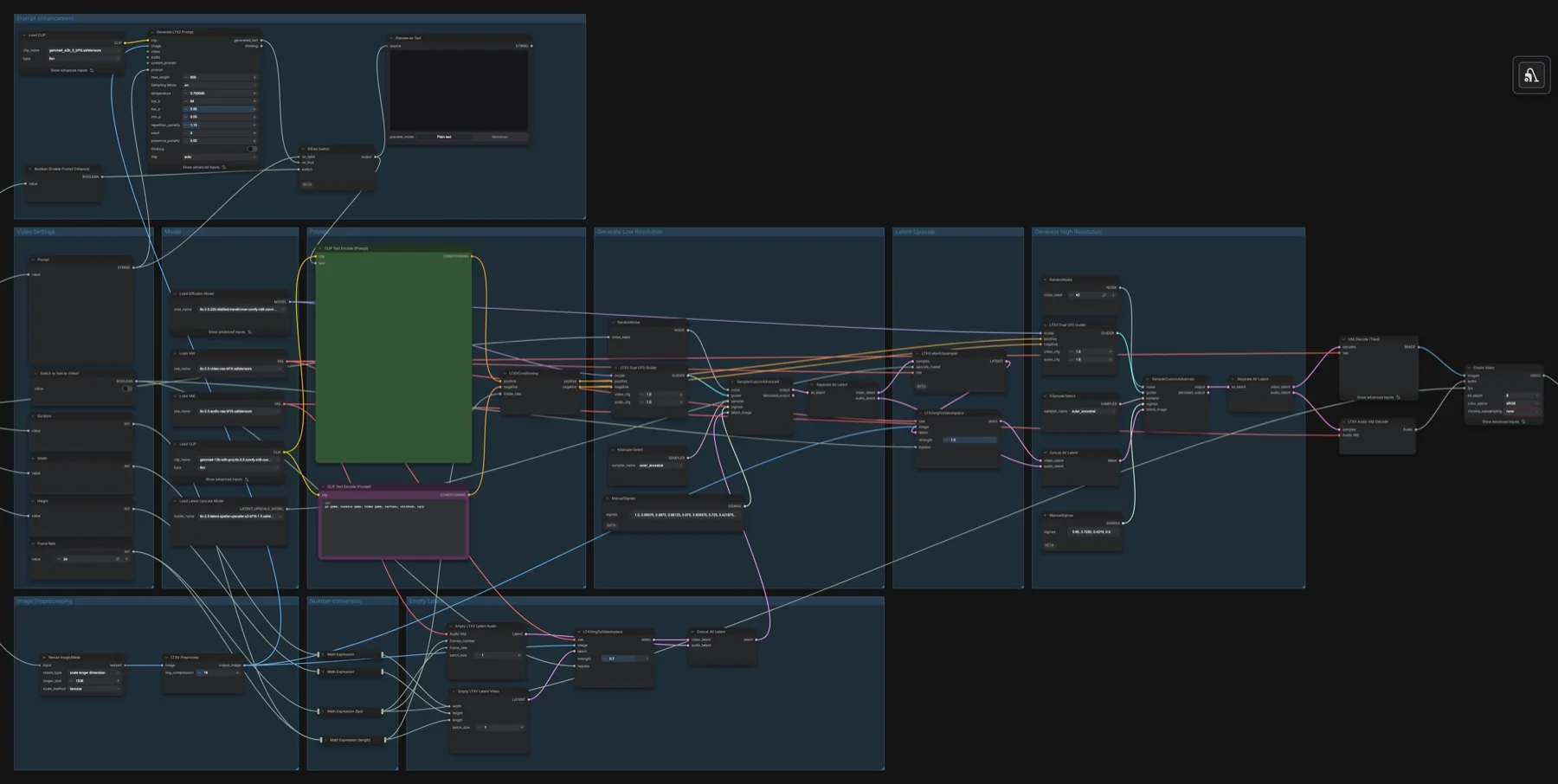
Download and load the workflow
Drag the downloaded JSON file onto the ComfyUI canvas to load it.
Install the model files and any custom nodes listed below. If the workflow uses input images, video or audio, select your own files in the input nodes before running it.
Which files go where
Place each file under your ComfyUI directory in the folder shown. A text encoder turns the prompt into model conditioning. A VAE decodes the sampled representation into image or audio data. A LoRA is an adapter loaded alongside the base model.
| Part | File | Size | Folder |
|---|---|---|---|
| text_encoders | gemma4_e2b_it_bf16.safetensors | 10.28 GB | models/text_encoders |
| diffusion_models | ltx-2.5-22b-distilled-transformer-comfy-int8-convrot.safetensors | Unconfirmed | models/diffusion_models |
| vae | ltx-2.5-video-vae-bf16.safetensors | Unconfirmed | models/vae |
| vae | ltx-2.5-audio-vae-bf16.safetensors | Unconfirmed | models/vae |
| text_encoders | gemma4-12b-with-proj-ltx-2.5-comfy-int8-convrot.safetensors | Unconfirmed | models/text_encoders |
| latent_upscale_models | ltx-2.5-latent-spatial-upscaler-x2-bf16-1.0.safetensors | Unconfirmed | models/latent_upscale_models |
The total download size is unconfirmed because the LTX-2.5 files require access. Disk size is not a measured VRAM requirement. Reuse matching files already installed rather than downloading a second copy.
Sign in to Hugging Face and accept the LTX-2.5 repository access conditions before downloading. Our unauthenticated size checks returned HTTP 401 for those files; only the separate 10.28 GB prompt-helper encoder had a confirmed size.
Settings in this workflow
| Control | Saved value |
|---|---|
| Duration / frame rate | 5 seconds / 24 fps |
| Resolution selector | 16:9, 0.8 megapixels, 32-pixel alignment |
| Sampler | euler_ancestral in both stages |
| Video / audio CFG | 1 / 1 |
| Prompt enhancement | enabled |
| Text-to-video switch | false |
| Initial image conditioning | 0.7 |
| Second-stage image conditioning | 1.0 |
| Latent upscaler | 2× spatial |
Saved sigma schedule: 1.0, 0.99375, 0.9875, 0.98125, 0.975, 0.909375, 0.725, 0.421875, 0.0.
Saved sigma schedule: 0.85, 0.7250, 0.4219, 0.0.
How to use it
- Load your first frame into Load First Frame and write the motion prompt.
- Select the LTX-2.5 files and both text encoders. Leave prompt enhancement enabled to use the saved prompt helper.
- Choose duration and size in the outer graph. Leave Switch to Text to Video? false for this task.
- Generate when ready. The graph samples, upscales the latent representation, samples again and combines decoded audio and video for MP4/H.264 saving.
What to check before changing the graph
The outer controls feed the subgraph, so internal saved width, height and frame values are not necessarily the executed dimensions. The two ManualSigmas nodes define separate noise schedules: the first has eight intervals, the second three. Sigmas describe noise levels across sampling. Keep each schedule attached to its own stage rather than replacing both with a single steps value. This LTX-2.5 graph uses Gemma 4 files; do not substitute the Gemma 3 prompt helper from the LTX-2.3 guide.
Licence
The repositories list LTX-2.x Community License Agreement. This is a community licence with conditions. Read the current terms before commercial use; a public download does not mean unrestricted use. See our model licence tracker for the wider collection.
Troubleshooting
| Problem | Likely cause | Fix |
|---|---|---|
| Missing nodes | Your installation differs from the captured environment | Update ComfyUI and reload the template before reconnecting nodes. |
| Model missing from a dropdown | File is in the wrong folder or the list is stale | Check the exact filename and folder above, then refresh the model list. |
| Unexpected output size or length | A connected input overrides an internal widget | Trace the size and duration connections from the outer graph. |
| 401 on download | Repository access has not been granted | Sign in and accept the repository conditions. |
Where to go next
FAQ
Are these output examples?
The featured image shows the workflow graph. The Output example section shows the actual saved generation from a PC with an RTX 3090.
Can I change the saved settings?
Yes. Keep the documented configuration as a reference and change one control at a time. Samplers, adapters and noise schedules work together, so treat a replacement recipe as a separate configuration.
Sources
- Comfy-Org/gemma-4: model files and repository licence metadata.
- Lightricks/LTX-2.5: model files and repository licence metadata.