
Short answer: Qwen-Image 2.1 Turbo is Alibaba's 8-step version of Qwen-Image 2.1, released on 9 October 2026. In ComfyUI you load the Turbo diffusion model in place of the base model, set 8 steps and CFG 1, and keep the same text encoder and VAE. It can write transparent (RGBA) images directly. Before you use it for client work, read the licence: the repository uses the Qwen Research License, not Apache-2.0.
Download and load the workflow
Drag the downloaded JSON file onto the ComfyUI canvas to load it.
Install the model files and any custom nodes listed below. If the workflow uses input images, video or audio, select your own files in the input nodes before running it.
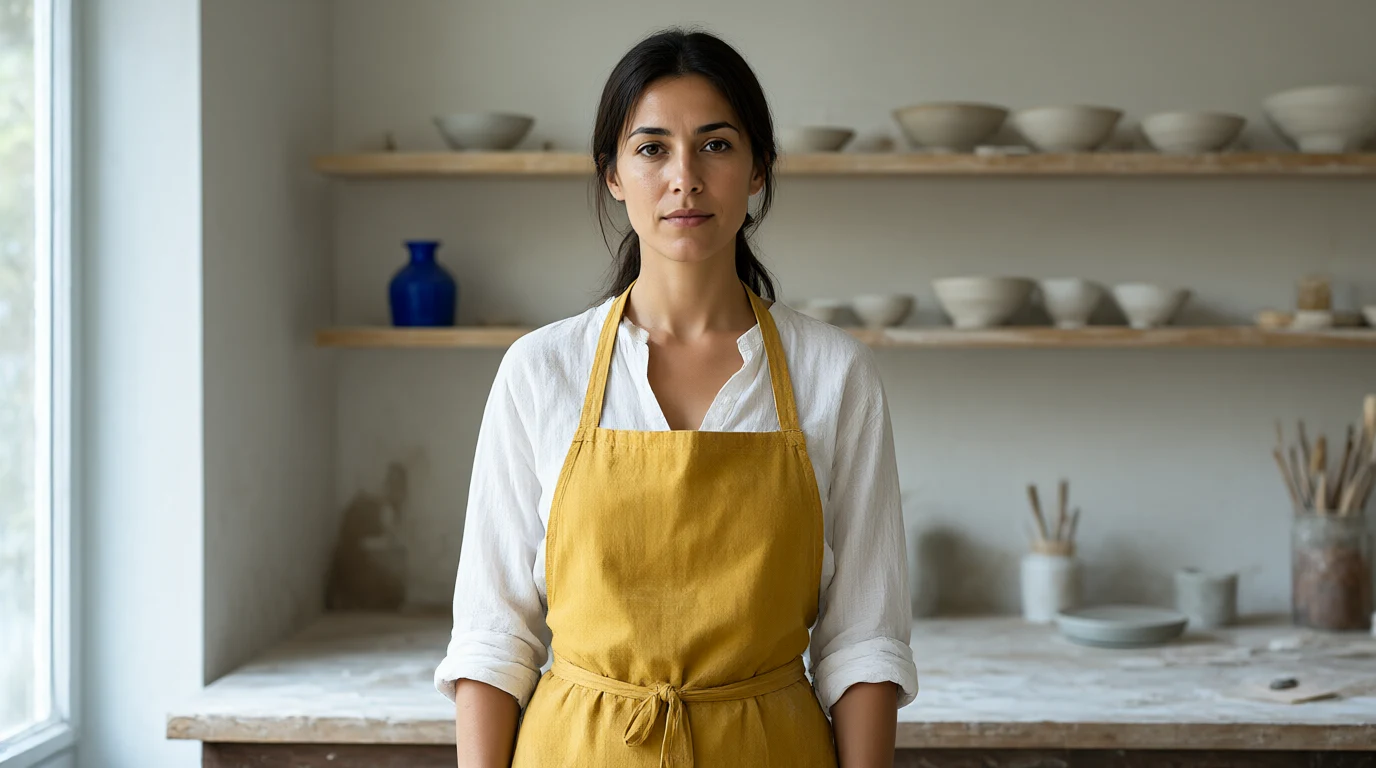
Output example
This workflow was run on a PC with an RTX 3090. We downloaded the saved output and inspected the image. It is one prompt and seed, not a general quality benchmark.
Prompt used for this example
The image is a photographic character-design study of an entirely fictional adult woman in a contemporary ceramics workshop. At the center she stands facing the camera, visible from the waist up, with shoulders level and arms resting naturally at her sides. She has straight dark brown hair tied back, brown eyes, olive skin, a narrow oval face and a calm neutral expression. She wears a mustard yellow canvas apron over a white linen shirt with rolled sleeves. Behind her, pale wooden shelves hold unglazed bowls and a small cobalt vase. Cool daylight enters from the left and illuminates the weave of her apron and the clay dust on the workbench. The upper part of her head is fully within the frame. This is an invented synthetic character rather than a real person, photographed with natural proportions and clear facial detail.Observed limits: Synthetic character. Saved widescreen framing is retained; hands fall outside the lower crop.
Free download: Qwen-Image 2.1 Turbo cheat sheet (PDF). It has the file list, settings, resolution presets, a troubleshooting table and 12 prompts for transparent assets on one printable sheet.
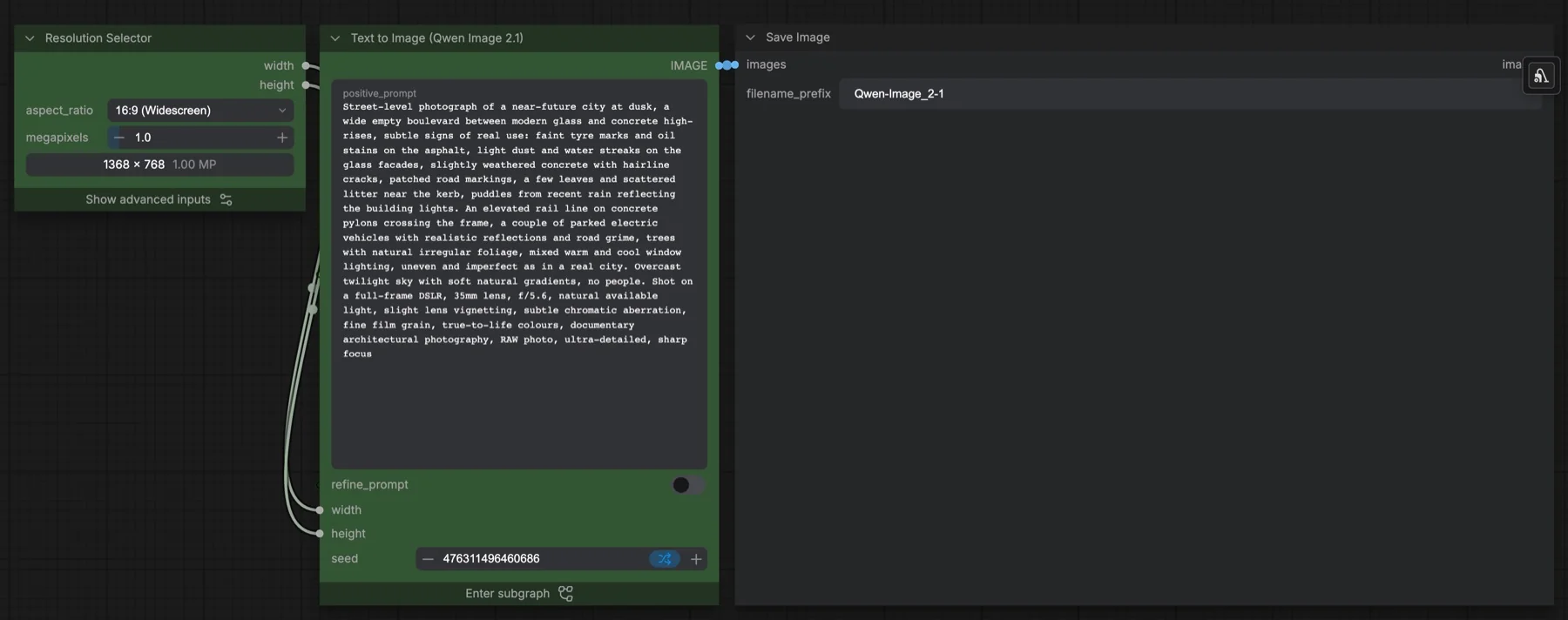
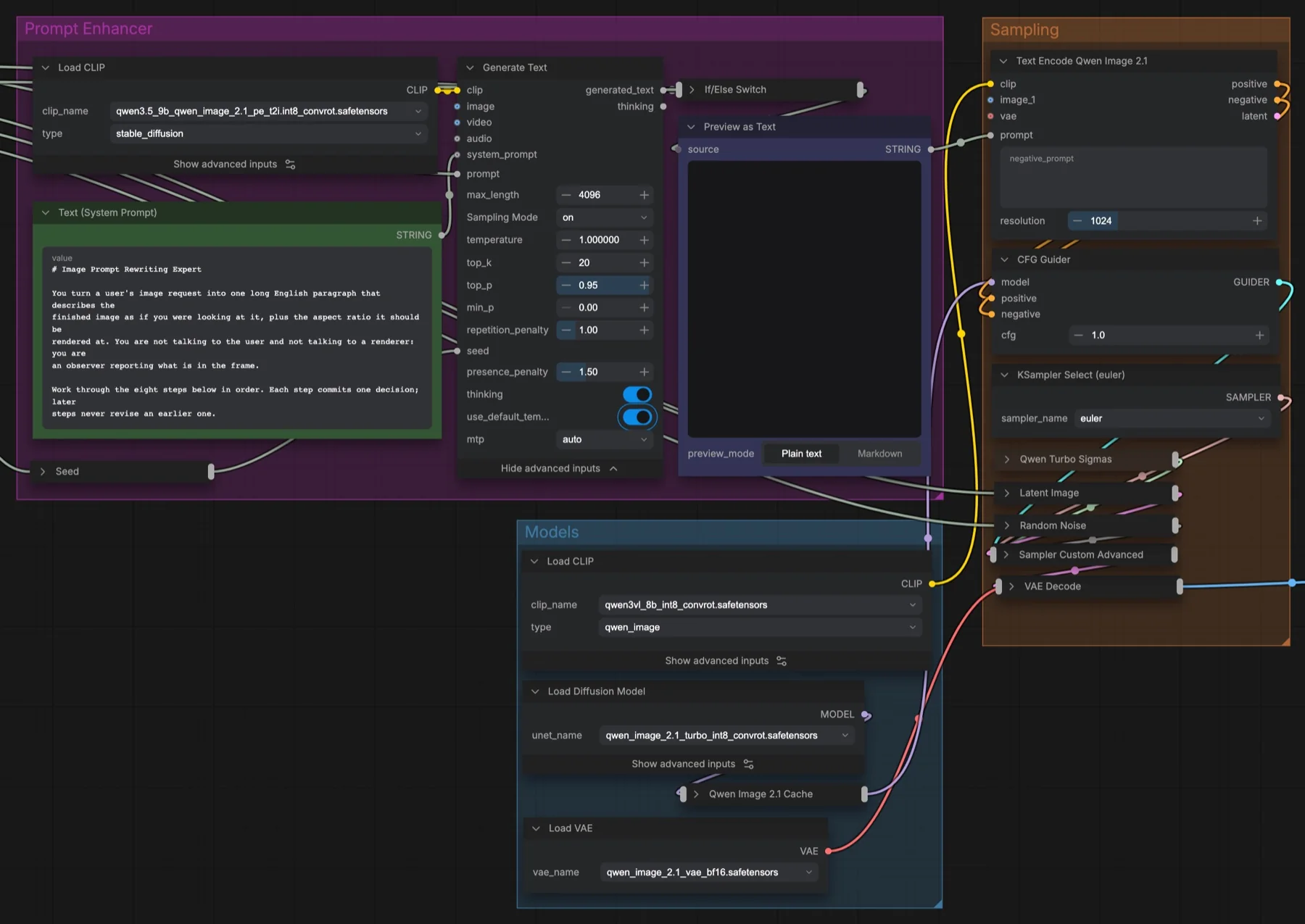
The featured image shows the saved workflow graph. The output example above is from a completed generation, with the prompt and limitations recorded separately.
What Turbo changes
Qwen-Image 2.1 arrived on 20 September 2026. It combines generation and editing in one model, with a 7B-parameter visual generation component. The base model needs about 40 denoising steps. Turbo is Alibaba's own distilled checkpoint: the same model and editing pipeline, with an 8-step schedule built into the checkpoint.
- Speed: 8 steps instead of about 40, at CFG 1.
- Editing: up to 10 reference images, plus local edits from circles, annotations or masks.
- Transparency: the model writes the alpha channel itself, so stickers, logos and product cut-outs come out ready to use.
- Hardware: the official repository lists support for AMD Radeon and Apple Silicon (Turbo through the LightX2V Mac app), and recommends model offloading on GPUs with limited memory.
Which files go where
ComfyUI supported Qwen-Image 2.1 from day 0, and the Turbo checkpoint arrived in ComfyUI v0.40.0 (13 October 2026). Update ComfyUI first. Then download the files from the Comfy-Org/Qwen-Image-2.1 repository.
| Option | File | Folder | Use it when |
|---|---|---|---|
| Full Turbo model | qwen_image_2.1_turbo_bf16.safetensors | models/diffusion_models | You have plenty of VRAM and want full precision. |
| Quantised Turbo model | qwen_image_2.1_turbo_int8_convrot.safetensors | models/diffusion_models | You need lower VRAM use. |
| Turbo LoRA | qwen_image_2.1_turbo_lora_avg_rank_178_bf16.safetensors | models/loras | You already have the base model and want to switch between base and Turbo. |
| Text encoder and VAE | The same files as Qwen-Image 2.1 | models/text_encoders, models/vae | Always. Turbo does not change them. |
Choose one of the first three rows. The LoRA route keeps one base model on disk and lets you turn Turbo on and off.
Settings that work
- Download the workflow above and drag the JSON file onto the ComfyUI canvas.
- Select the Turbo diffusion model (or the base model plus the Turbo LoRA).
- Set the sampler to 8 steps and CFG 1.
- Choose the output size. The captured workflow uses 1368 × 768, around one megapixel. The larger 2048 × 2048 and 2752 × 1536 presets in the cheat sheet are separate options, not the captured defaults.
- Generate.
Two details matter. First, the 8-step schedule is built into the checkpoint. The model card says that changing the step count alone does not override that schedule. Kijai reports that the saved sigmas are close to ComfyUI's linear_quadratic scheduler with no shift. Second, some community workflows (for example on RunComfy) use a manual sigma list. If you change the sampler family or the step count, replace that list with one made for the new configuration.
Community posts suggest CFG 1.5–3.5 for the first steps and CFG 1 for the rest. That advice is for the base model, not Turbo. Start with 8 steps at CFG 1 and change one setting at a time.
Transparent PNGs without background removal
Most image models give you a flat background, and you remove it in a second tool. Qwen-Image 2.1 writes the alpha channel itself. Save as PNG to keep it. Prompts that describe one isolated subject work best:
- "A glossy die-cut sticker of a cartoon fox astronaut, thick white border, isolated, transparent background"
- "Flat vector logo mark of a paper plane inside a circle, two colours, transparent background"
- "Studio product cut-out of a matte black ceramic coffee cup, soft contact shadow, transparent background"
The cheat sheet has 12 of these prompts, grouped by stickers, logos, product shots and UI icons.
The licence catch
The first Qwen-Image release in 2025 used Apache-2.0, so many people assume version 2.1 does too. It does not. The Qwen-Image-2.1 repository says it is licensed under the Qwen Research License Agreement, and reports describe it as research-only or non-commercial. If you make images for paying clients, read the licence text first. For commercial work you can use an Apache-2.0 alternative such as MOSS-Image. Our licence tracker compares the current options.
Troubleshooting
| Problem | Likely cause | Fix |
|---|---|---|
| Images look burnt or too contrasty | CFG is above 1 | Set CFG to 1. |
| Images look unfinished or noisy | A manual sigma list does not match the step count | Use 8 steps, or replace the sigma list. |
| Model does not load | ComfyUI is older than v0.40.0 | Update ComfyUI and restart. |
| Out-of-memory error | The BF16 model is too large for the GPU | Use the INT8 convrot file, or turn on model offloading. |
| Background is not transparent | The image was saved as JPEG, or the prompt describes a scene | Save as PNG and describe one isolated subject. |
Where to go next
- New to node-based control? Start with our controllable diffusion project in ComfyUI.
- Need exact layout control for posters and thumbnails? See MOSS-Image layout boxes in ComfyUI.
- More free files: all Synthetic Labs downloads.
FAQ
Is Qwen-Image 2.1 Turbo free for commercial use?
Not by default. The repository uses the Qwen Research License Agreement. Read the licence or contact Alibaba's Qwen team before you use it commercially.
How many steps does Qwen-Image 2.1 Turbo need?
8 steps at CFG 1. The base Qwen-Image 2.1 model needs about 40.
Can Qwen-Image 2.1 Turbo edit images?
Yes. It uses the same editing pipeline as the base model, including multi-reference edits with up to 10 images, in 8 steps at CFG 1.
Does it run on a Mac?
The official repository lists Apple Silicon support for Turbo through the LightX2V Mac app. In ComfyUI on a Mac, use the INT8 file and expect slower generation than on a recent NVIDIA GPU.
Sources
- QwenLM/Qwen-Image-2.1 on GitHub: release dates, licence, features, hardware support
- Comfy-Org/Qwen-Image-2.1 on Hugging Face: ComfyUI weight files
- ComfyUI Wiki: Qwen-Image 2.1 Turbo: file names, 8-step and CFG 1 settings, scheduler note
- ComfyUI changelog: v0.40.0 Turbo support
- Hugging Face discussion: community CFG schedule for the base model