
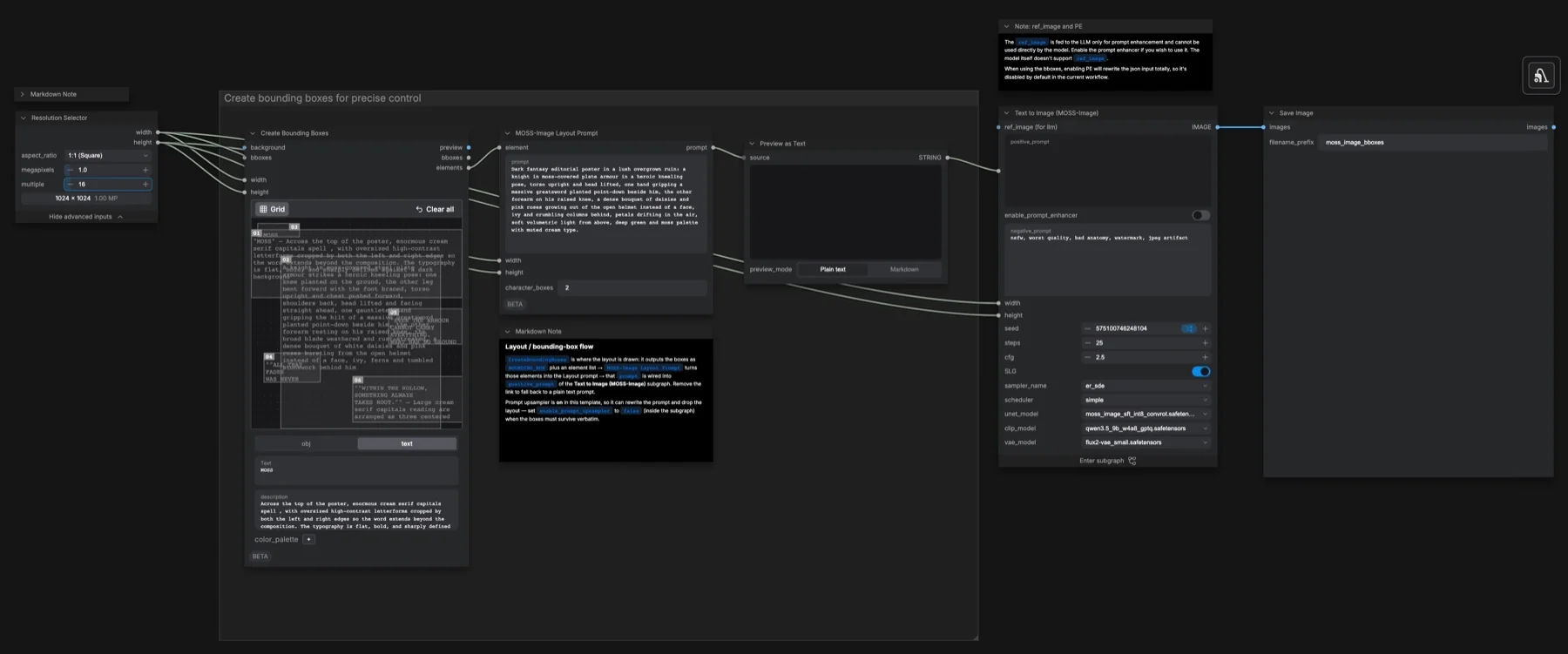
Short answer: MOSS-Image is a 5B text-to-image model from OpenMOSS, released on 16 October 2026 under Apache-2.0. Its main feature is layout control: you draw boxes for text, characters and objects, and the model places them there. ComfyUI added core support in v0.42.0 (18 October 2026). Use the SFT checkpoint, 50 steps, CFG 3 and shift 5.
Download and load the workflow
Drag the downloaded JSON file onto the ComfyUI canvas to load it.
Install the model files and any custom nodes listed below. If the workflow uses input images, video or audio, select your own files in the input nodes before running it.
Output example
This workflow was run on a PC with an RTX 3090. We downloaded the saved output and inspected the image. It is one prompt and seed, not a general quality benchmark.

Prompt used for this example
A modern botanical exhibition poster on pale cream paper. Large forest-green headline "GROW SLOW" across the top. A single sculptural potted monstera with deep green split leaves and a terracotta pot is centered below. Small forest-green footer "BOTANICAL STUDIES" at the bottom. Flat screen-print illustration, crisp shapes, generous negative space, restrained green, terracotta and cream palette.Observed limits: One fixture verifies this layout, not arbitrary box accuracy; output is a flattened raster poster.
Free download: MOSS-Image layout planner (PDF) and the same boxes as a CSV. They contain six ready-made layouts (poster, product hero, YouTube thumbnail, book cover, two-panel comic, infographic) with box positions in normal pixels and in the model's centre-based format.
Why MOSS-Image is worth a look
- Commercial-friendly licence. The model card says the weights and inference code are released under Apache-2.0. Compare this with Qwen-Image 2.1, which uses a research licence. See our licence tracker.
- Text where you want it. Layout prompts tell the model where each headline, logo or character goes. This is useful for posters, thumbnails and covers.
- Three prompt styles. It accepts natural language, tag lists and JSON layouts.
- Extra control. ComfyUI v0.42.2 added colour-map and depth-map conditioning for MOSS-Image, and v0.43.0 added edit LoRA support.
Which files go where
Update ComfyUI to v0.42.0 or later. Then download the single-file weights from Comfy-Org/MOSS-Image.
| Part | File | Size | Folder |
|---|---|---|---|
| Model (choose one) | moss_image_sft_bf16 | 10.2 GB | models/diffusion_models |
moss_image_sft_int8_convrot | 5.4 GB | models/diffusion_models | |
| Text encoder (choose one) | qwen3.5_9b_int8_convrot | 9.8 GB | models/text_encoders |
qwen3.5_9b_w4a8_gptq | 7.3 GB | models/text_encoders | |
| VAE | flux2-vae.safetensors | 340 MB | models/vae |
The smallest complete set is the INT8 model, the W4A8 text encoder and the VAE: about 13 GB. Use SFT for normal work. Use Base only as a starting point for LoRA training.
Model-card reference settings
| Setting | Value |
|---|---|
| Sampler | Flow-matching Euler |
| Steps | 50 or more |
| CFG | 3 (the useful range is 3–6) |
| Shift | 5 |
| Layer skipping | Negative branch at layer 22 (22, 24 and 26 also help) |
| Resolution | 1, 1.5 or 2 megapixels; sides must be multiples of 16 |
| Negative prompt | nsfw, worst quality, bad anatomy, watermark, jpeg artifact |
When you turn layer skipping off, images look more realistic, but fine detail can collapse. For tag prompts, the recommended order is quality, score, meta, year, character, series, artist, general.
The reference recipe above differs from the saved workflow. The workflow uses 25 steps, CFG 2.5 and flux2-vae_small.safetensors. These are documented settings, not a tested quality comparison. The graph capture and completed output example document different stages of this test.
How layout boxes work
In ComfyUI, draw boxes with the Create Bounding Boxes node and connect it to the MOSS-Image Layout Prompt node. That node converts the boxes into the JSON layout that the model reads. Each box gets a label (text, character or object) and a short caption. Text boxes also get the exact words to print.
If you write the JSON yourself (Python or the Gradio demo), two details are easy to get wrong:
- Box order is y first:
[y_min, x_min, y_max, x_max](bbox_format: "yxyx"). - Coordinates start at the centre:
bbox_coord_space: "abs_centralized"means pixels from the middle of the canvas. On a 1024 × 1024 image, each axis runs from −512 to +512.
To convert a normal box (origin at the top-left corner) for an image of width W and height H:
y_min = top    - H/2
x_min = left   - W/2
y_max = bottom - H/2
x_max = right  - W/2
Example: a simple poster at 1024 × 1024.
| Element | Label | Pixels (left, top → right, bottom) | Model box [y_min, x_min, y_max, x_max] |
|---|---|---|---|
| Headline "NIGHT MARKET" | text | 112, 64 → 912, 224 | [-448, -400, -288, 400] |
| Lantern seller | character | 212, 256 → 812, 864 | [-256, -300, 352, 300] |
| Date line "FRI 7 NOV" | text | 212, 896 → 812, 976 | [384, -300, 464, 300] |
The layout planner download has this layout and five more, already converted. The official guide calls JSON layouts experimental, so the model may not follow every box exactly. Large, separate boxes work better than small boxes that overlap.
Other MOSS workflows
For different tasks, use our separate guides to text-to-image, image editing and colour and depth control.
Troubleshooting
| Problem | Likely cause | Fix |
|---|---|---|
| MOSS-Image nodes are missing | ComfyUI is older than v0.42.0 | Update ComfyUI and restart. |
| Elements appear in the wrong places | x and y are swapped, or the coordinates start at the corner | Use y-first order and centre-based coordinates. |
| Error about the image size | A side is not a multiple of 16 | Use sizes such as 1024, 1152 or 1536. |
| Fine detail looks smeared | Layer skipping is off, or there are too few steps | Use layer 22 skipping and at least 50 steps. |
| Out-of-memory error | BF16 model and INT8 encoder together are too large | Use the INT8 model and the W4A8 text encoder. |
Where to go next
- Need transparent PNGs? Read Qwen-Image 2.1 Turbo in ComfyUI, but check its licence first.
- Want structure control from edges and depth? See our controllable diffusion project.
- More free files: all Synthetic Labs downloads.
FAQ
Can I use MOSS-Image commercially?
The MOSS-Image-SFT model card says the weights and bundled inference code are under Apache-2.0, which allows commercial use. Check the model card again before a large project, because licences can change.
What is the difference between MOSS-Image Base and SFT?
SFT is tuned for normal image generation. Base is the starting point for LoRA training. Both have 5B parameters.
How much disk space does MOSS-Image need?
About 13 GB for the smallest set (INT8 model, W4A8 text encoder and VAE), and about 20 GB with the BF16 model and INT8 text encoder.
Does MOSS-Image need an NVIDIA GPU?
The model card lists an NVIDIA GPU with CUDA and PyTorch 2.9 or later for the reference code. It does not give a VRAM figure. CPU offload options are available in the project quick start.
Sources
- OpenMOSS-Team/MOSS-Image-SFT on Hugging Face: licence, size, settings, layout format
- Comfy-Org/MOSS-Image on Hugging Face: ComfyUI weight files
- ComfyUI Wiki: MOSS-Image: file sizes, folders, node names, tips
- ComfyUI changelog: v0.42.0, v0.42.2 and v0.43.0 MOSS-Image support
- MOSS-Image demo on Hugging Face Spaces