
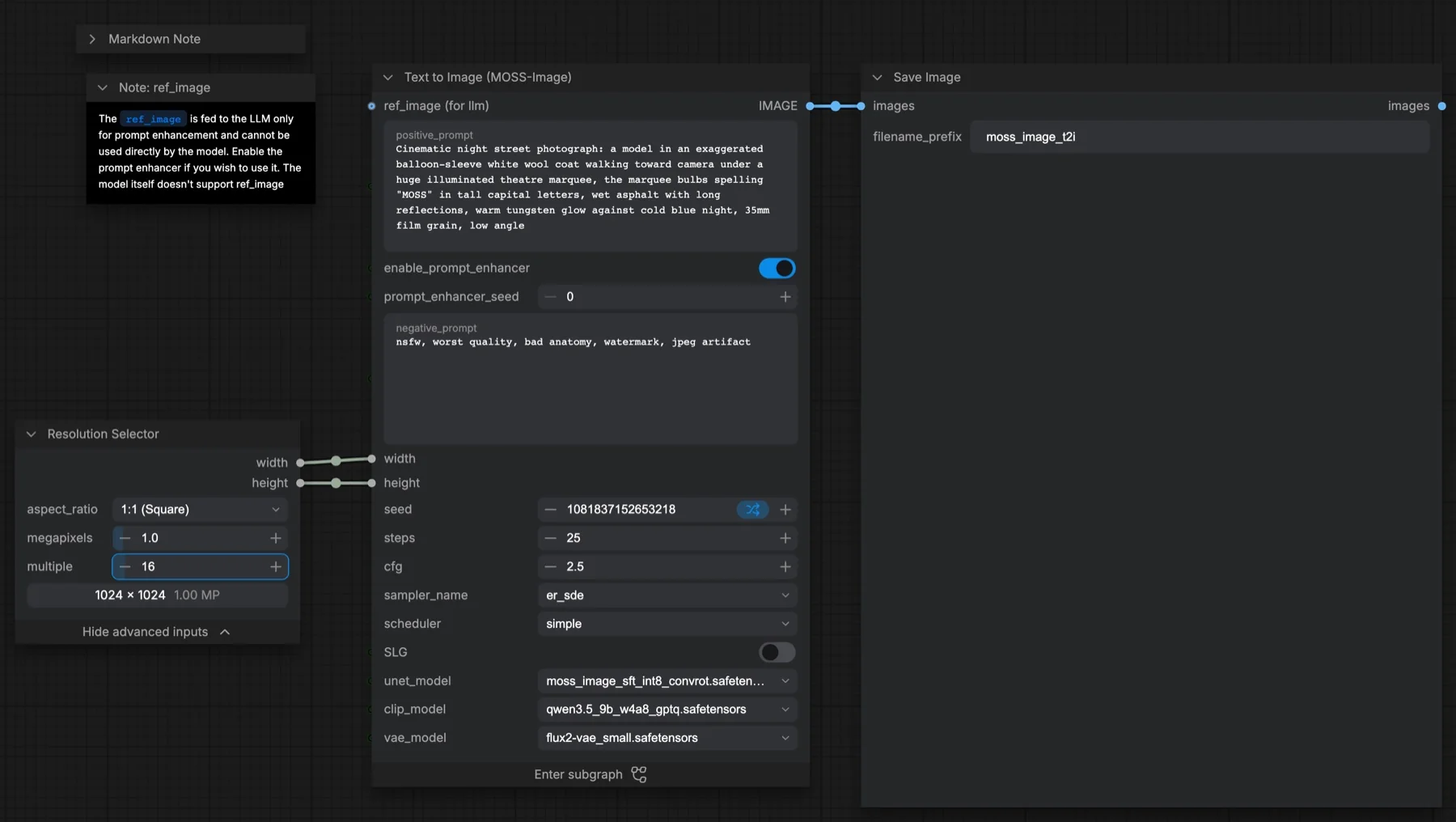
Short answer: this ComfyUI template makes one image from a text prompt with MOSS-Image, using the INT8 SFT model, the W4A8 Qwen3.5 9B text encoder and the small FLUX.2 VAE. It runs 25 steps, CFG 2.5, the er_sde sampler and the simple scheduler at 1024 × 1024. A prompt enhancer expands short requests first. The official reference values are 50 steps and CFG 3. The three files total about 13.0 GB, and the repository lists Apache-2.0, which allows commercial use.
Output example
This workflow was run on a PC with an RTX 3090. We downloaded the saved output and inspected the image. It is one prompt and seed, not a general quality benchmark.
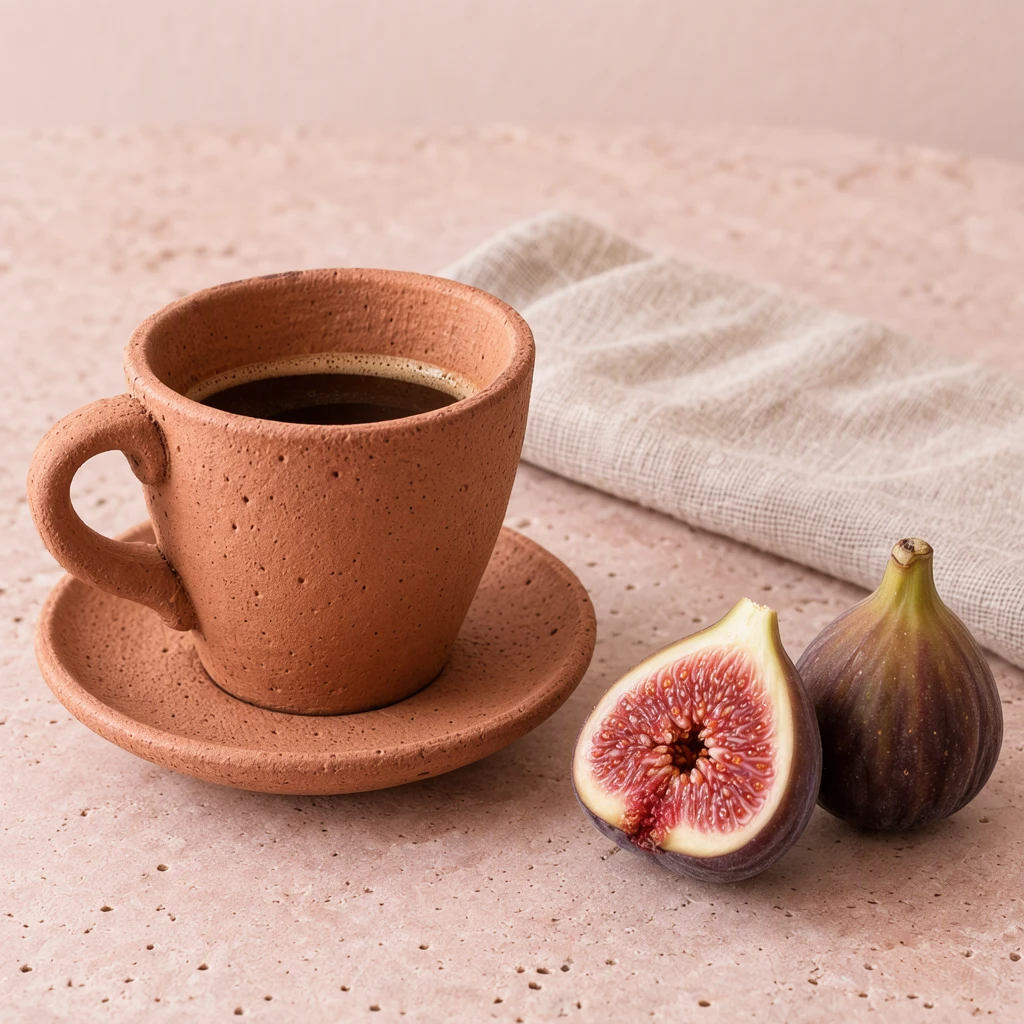
Prompt used for this example
A studio photograph of a handmade terracotta espresso cup and matching saucer beside two figs, one whole and one cut open to show its ruby interior, on a pale pink limestone slab. The cup occupies the left half, the figs sit at lower right, and a folded oatmeal linen napkin extends behind the saucer. Soft window light from upper left creates short coherent shadows. Tiny glaze pinholes, uneven handmade rim, matte fruit skin and individual fig seeds are visible. Muted clay, blush and burgundy palette, clean editorial food photography, no lettering.Observed limits: Single fixture and seed; fine food and ceramic detail is generated, not measured against ground truth.
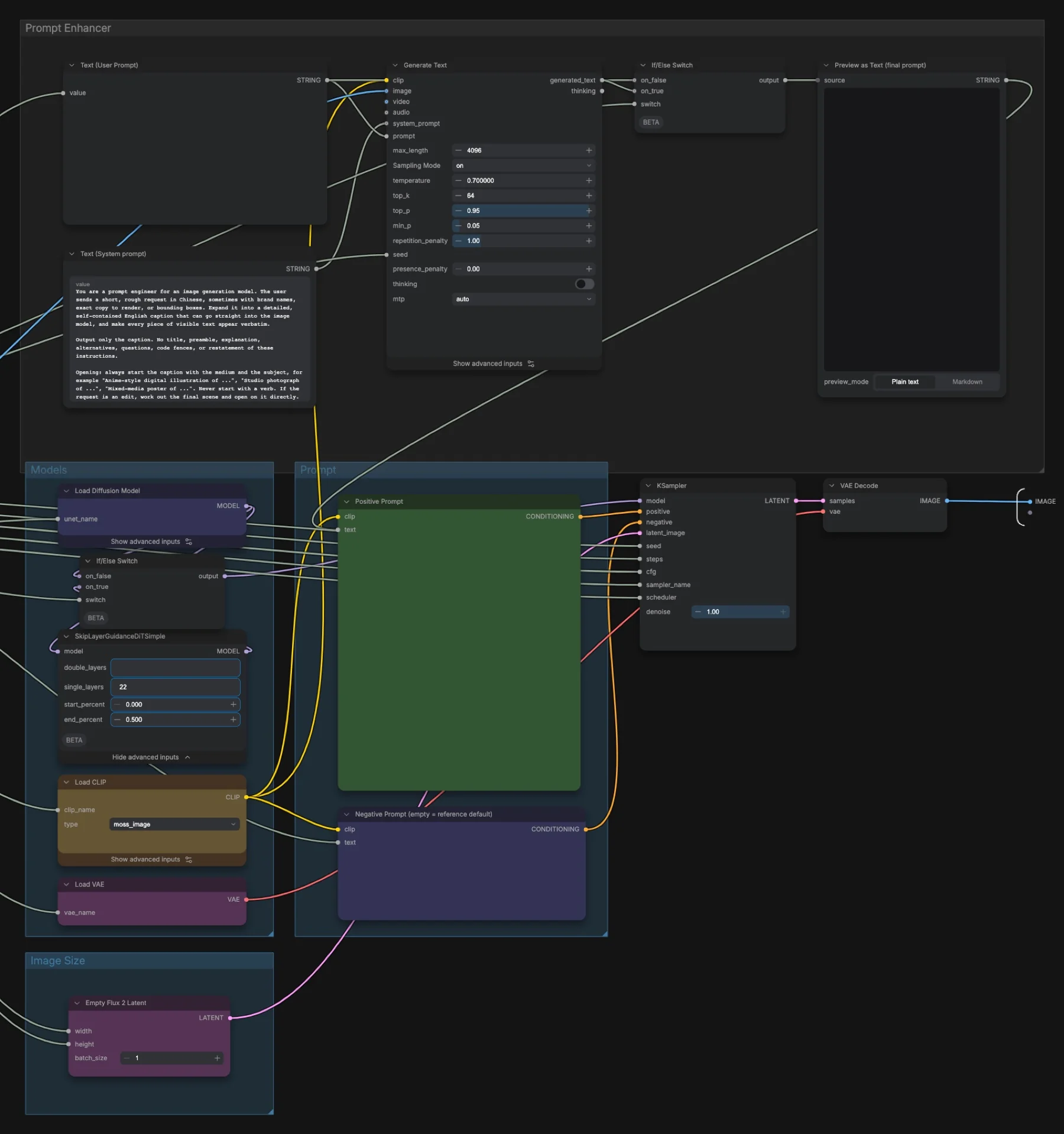
Download and load the workflow
Drag the downloaded JSON file onto the ComfyUI canvas to load it.
Install the model files and any custom nodes listed below. If the workflow uses input images, video or audio, select your own files in the input nodes before running it.
Which files go where
| Part | File | Size | Folder |
|---|---|---|---|
| Diffusion model | moss_image_sft_int8_convrot.safetensors | 5.41 GB | models/diffusion_models |
| Text encoder | qwen3.5_9b_w4a8_gptq.safetensors | 7.34 GB | models/text_encoders |
| VAE | flux2-vae_small.safetensors | 0.25 GB | models/vae |
The total is about 13.0 GB. The repository is not gated, and no custom node packs are needed. Our MOSS-Image layout post lists the larger BF16 model and INT8 text encoder if you want to swap them in.
Settings in this workflow
| Setting | This workflow | Official reference |
|---|---|---|
| Steps | 25 | 50 |
| CFG | 2.5 | 3 |
| Sampler | er_sde | Euler |
| Scheduler | simple, denoise 1 | default |
| Shift | 5 (model default) | 5 |
| Skip layer guidance | Off; when on, layer 22, 0 to 0.5 of the run | Layer 22 |
| Resolution | 1024 × 1024 (1:1, 1 megapixel, multiple of 16) | 1, 1.5 or 2 megapixels |
| Negative prompt | nsfw, worst quality, bad anatomy, watermark, jpeg artifact | |
| Prompt enhancer | On, max length 4096, temperature 0.7, top_k 64, top_p 0.95, min_p 0.05 | Not applicable |
The workflow notes say the template follows faster settings from a community ComfyUI pull request for MOSS-Image. That is a speed trade-off, not a bug. For results closer to the official ones, try 50 steps and CFG 3. CFG (classifier-free guidance) sets how strongly the model follows your prompt over the negative prompt. Skip layer guidance (SLG) skips one layer of the model when it computes the negative branch.
How to use it
- Set the aspect ratio and megapixels in Resolution Selector. Keep the multiple at 16, because MOSS-Image needs sides that are multiples of 16.
- Type your request in positive_prompt. Quote any words you want printed.
- Leave enable_prompt_enhancer on for short requests. Turn it off when your prompt is already detailed.
- Optional: connect an image to ref_image. The note says only the prompt enhancer sees it; the image model does not.
- Decide on SLG, then queue. Read Preview as Text (final prompt) inside the subgraph to see what the model got.
Tips from the workflow notes
- Resolution: 1, 1.5 or 2 megapixels are recommended. The model can stretch from 0.25 megapixels (512 × 512) to 4 megapixels, at any aspect ratio.
- Language: English and Chinese both work, but English is preferred because most training data is English. Prompts can be about 4,000 tokens long.
- Text layout: automatic line breaks may not match what you want. Put
\nor real new lines in the prompt. - SLG trade-off: with SLG off, images look more realistic but detail can collapse. Community notes say SLG can overblow anime styles.
- Shift: change it with ModelSamplingAuraFlow or ModelSamplingFlux inside the subgraph. ModelSamplingSD3 uses a different scale.
Licence
The Comfy-Org/MOSS-Image repository lists Apache-2.0, which allows commercial use. The workflow notes say the same. Our licence tracker compares the other open models.
Troubleshooting
| Problem | Likely cause | Fix |
|---|---|---|
| MOSS-Image nodes are missing | ComfyUI is older than v0.42.0 | Update ComfyUI and restart. |
| Out-of-memory error | Resolution too high, or the enhancer adds load | The notes say to lower the resolution or use sequential or CPU offload. You can also turn the enhancer off. |
| Error about the image size | A side is not a multiple of 16 | Set the Resolution Selector multiple to 16. |
| Printed text breaks in the wrong place | Automatic line breaks | Add \n or new lines where you want them. |
| Banding in SFT images | A known SFT issue in the community notes | Try the experimental community LoRA linked in the notes at about −0.5 strength. |
Where to go next
- Place text and objects with boxes: MOSS-Image layout boxes.
- Change one thing in a photo: MOSS-Image image edit.
- Keep the pose of a reference photo: MOSS-Image colour and depth control.
- Another design-focused model: Ming Image 0.1 Design text to image.
FAQ
Why 25 steps instead of 50?
The template uses faster community settings. The notes call it a speed trade-off and suggest 50 steps and CFG 3 for results closer to the official ones.
Does MOSS-Image use the ref_image input?
No. The note says the reference image only goes to the prompt enhancer, and only when the enhancer is on.
Which prompt styles work?
The notes list natural language, tag sequences and JSON layouts. JSON layouts are experimental.
Sources
- Comfy-Org/MOSS-Image on Hugging Face: ComfyUI weight files, Apache-2.0 licence
- MOSS-Image user guide on GitHub: resolution, prompt styles, SLG and negative prompt advice
- ComfyUI pull request #17095: the community pull request behind the faster sampling settings
- Experimental SFT banding LoRA: community fix named in the notes
- OpenMOSS-Team/MOSS-Image-SFT model card: official settings and licence