
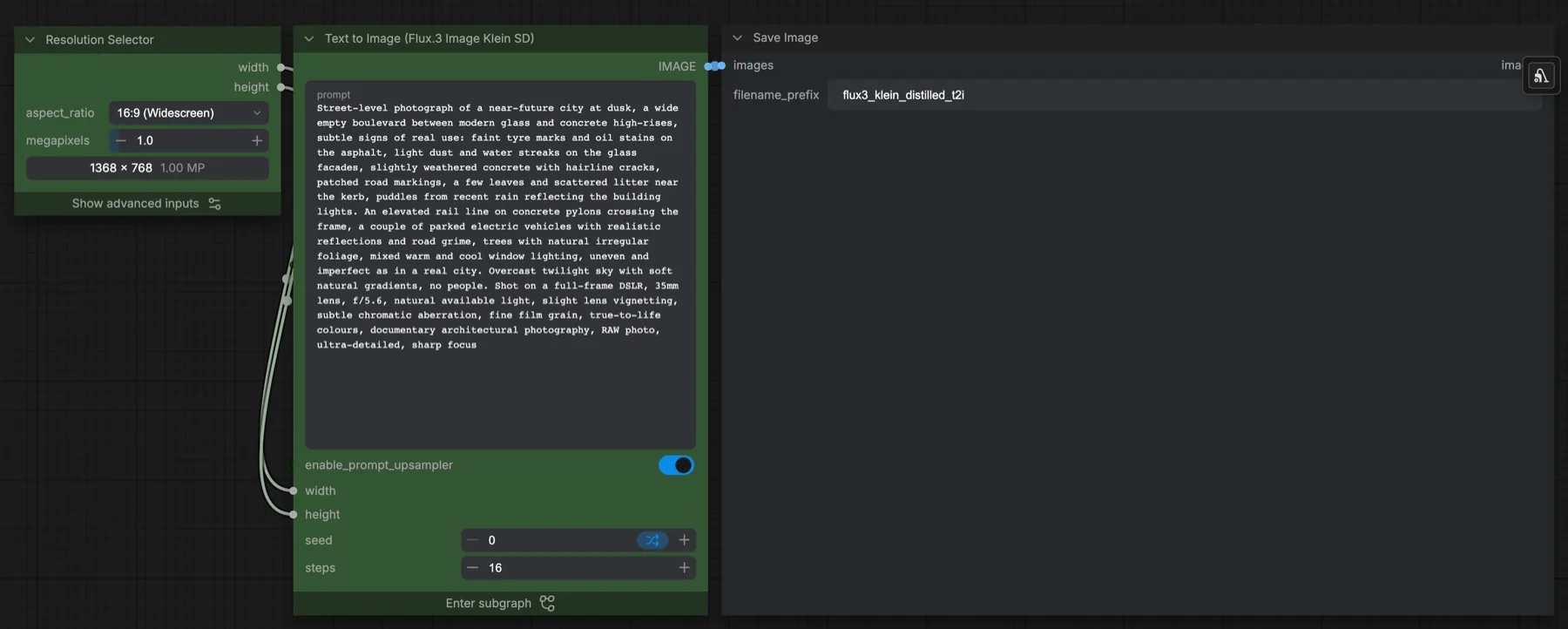
Short answer: this built-in ComfyUI template makes one image from a text prompt with the distilled FLUX 3 Image Klein model. It runs 16 steps at CFG 1 with the er_sde sampler, and a Qwen 3.5 9B prompt upsampler can expand your prompt first. It loads four files from a gated Hugging Face repository, so we could not check their sizes without signing in. The repository lists the flux-kommunity-license, which has conditions.
Output example
This workflow was run on a PC with an RTX 3090. We downloaded the saved output and inspected the image. It is one prompt and seed, not a general quality benchmark.

Prompt used for this example
An indoor photograph of a sculptural cobalt-blue glass vase holding three orange calla lilies on a pale travertine plinth. The vase sits just left of center, with ample warm ivory wall to the right. Afternoon sunlight enters from the upper left, casting long leaf shadows across the textured plaster wall. The glass has translucent edges, tiny bubbles and a thick polished foot; the flowers have curled waxy petals and natural green stems. A single fallen orange petal rests near the plinth edge. Quiet contemporary still-life photography, eye-level framing, crisp mineral grain and realistic contact shadows, subtle warm and cool color separation.Observed limits: Four lilies are visible although the prompt requested three; window edge is an additional scene element.
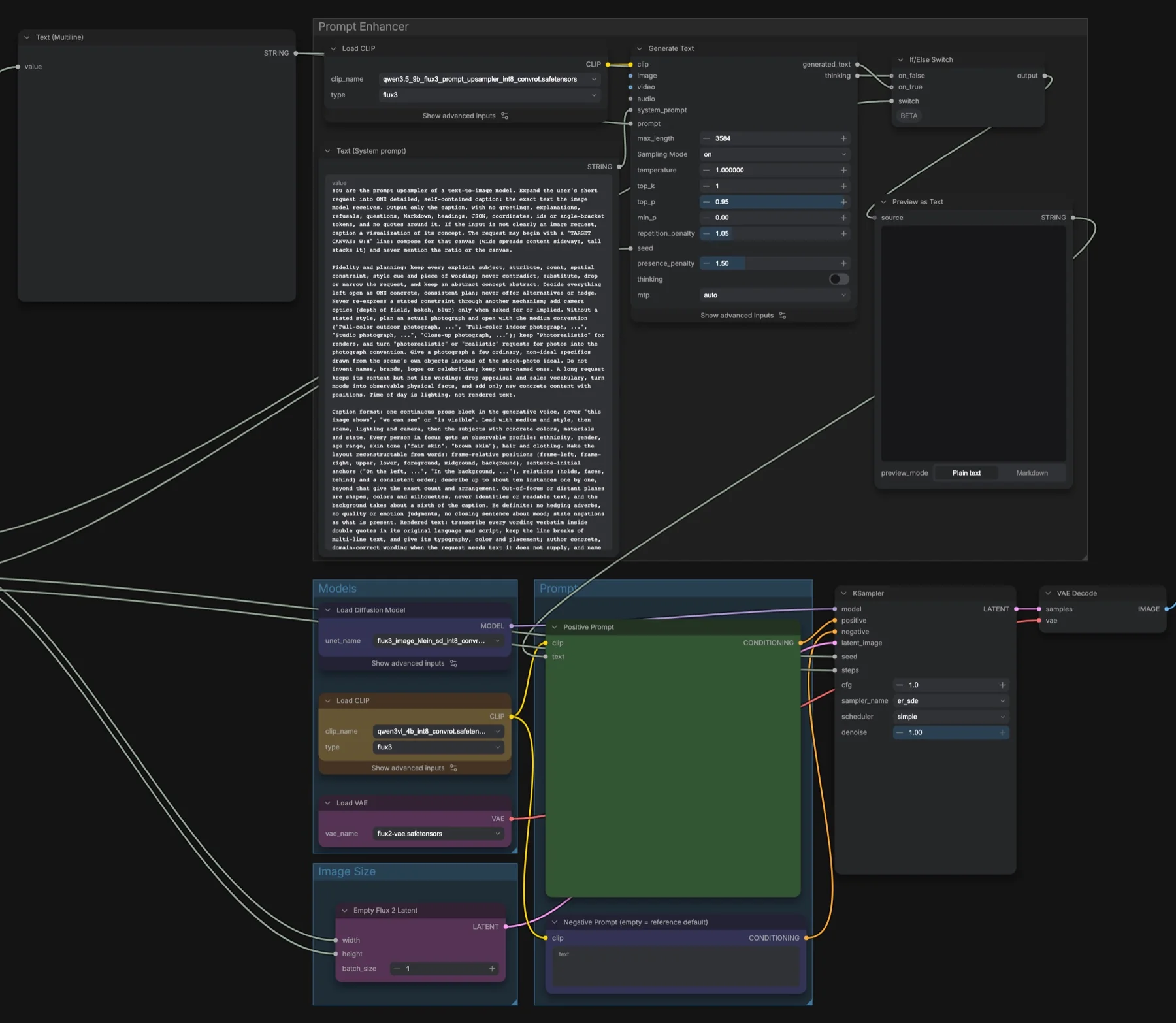
Download and load the workflow
Drag the downloaded JSON file onto the ComfyUI canvas to load it.
Install the model files and any custom nodes listed below. If the workflow uses input images, video or audio, select your own files in the input nodes before running it.
Which files go where
| Part | File | Size | Folder |
|---|---|---|---|
| Diffusion model | flux3_image_klein_sd_int8_convrot.safetensors | Not checked | models/diffusion_models |
| Text encoder | qwen3vl_4b_int8_convrot.safetensors | Not checked | models/text_encoders |
| Prompt upsampler | qwen3.5_9b_flux3_prompt_upsampler_int8_convrot.safetensors | Not checked | models/text_encoders |
| VAE | flux2-vae.safetensors | Not checked | models/vae |
All four files come from black-forest-labs/flux-3-image-klein-comfy. The repository is gated: sign in to Hugging Face and accept the licence on the repository page before you download. Without that, the links return an access error, which is also why we cannot give a total size. No custom node packs are needed.
Settings in this workflow
| Setting | Value |
|---|---|
| Steps | 16 (set on the subgraph) |
| CFG | 1 |
| Sampler and scheduler | er_sde, simple |
| Denoise | 1 |
| Resolution | 16:9 at 1 megapixel (1368 × 768) |
| Prompt upsampler | On |
| Negative prompt | Empty (the node title says empty uses the reference default) |
| Upsampler text settings | Max length 3584, temperature 1, top_p 0.95, repetition penalty 1.05, presence penalty 1.5, thinking off |
CFG (classifier-free guidance) controls how hard the prompt pushes the image. The template description says this distilled model runs with no classifier-free guidance, which is what CFG 1 means. The same description says 15 steps. The KSampler inside stores 15, but the subgraph's steps field is linked to it and set to 16, so 16 is what runs.
How to use it
- In Resolution Selector, pick an aspect ratio and a megapixel value. Width and height feed the subgraph.
- Type your prompt in the subgraph's prompt box.
- Leave enable_prompt_upsampler on for short prompts, or turn it off to send your own text unchanged.
- Set a seed and the step count.
- Run the queue. Save Image writes files with the prefix
flux3_klein_distilled_t2i.
How the prompt upsampler works
Inside the subgraph, a Generate Text node runs the Qwen 3.5 9B upsampler with a long system prompt. In plain terms, it tells the model to turn your request into one detailed caption. It must keep every subject, count, position and piece of wording you gave. If you name no style, it plans a real photograph. Text you want in the image is kept word for word inside double quotes. The caption is written in English and is usually 100 to 350 words.
An If/Else Switch picks the upsampled caption or your original prompt, and Preview as Text shows the result. Check it there when the image does not match what you typed.
Licence
The flux-3-image-klein-comfy repository lists the flux-kommunity-license. It is not Apache-2.0 or MIT. It has conditions, so read it before you use the model or its images commercially. Our licence tracker compares it with other open image and video models.
Troubleshooting
| Problem | Likely cause | Fix |
|---|---|---|
| 401 error when downloading | The repository is gated | Sign in to Hugging Face and accept the licence, then download again. |
| Nodes such as Generate Text or Empty Flux 2 Latent are missing | ComfyUI is out of date | Update ComfyUI and restart. |
| Out-of-memory error | The 9B upsampler, the 4B text encoder and the image model all load in one run | Turn the prompt upsampler off, or lower the megapixels in Resolution Selector. |
| The image ignores part of your prompt | The upsampler rewrote it | Read Preview as Text, then rephrase or turn the upsampler off. |
Where to go next
- Edit a FLUX 3 Klein image with words: FLUX 3 Klein image edit in ComfyUI.
- Want an Apache-2.0 text-to-image model? See Z-Image-Turbo in ComfyUI.
- Upscale the result: SeedVR2 7B image upscale in ComfyUI.
FAQ
Can I use FLUX 3 Klein commercially?
Only within the terms of the flux-kommunity-license. It has conditions, so read it first.
How many steps does the workflow use?
16, set on the subgraph. The template description says 15. Both run at CFG 1.
Do I need the prompt upsampler?
No. Switch it off and the workflow sends your own prompt to the text encoder. Write a full description if you do.
Sources
- black-forest-labs/flux-3-image-klein-comfy on Hugging Face: ComfyUI weight files, gating and licence
- ComfyUI template FLUX 3 Image Klein Distilled: Text to Image: node values, system prompt and the 15-step, no-guidance description