
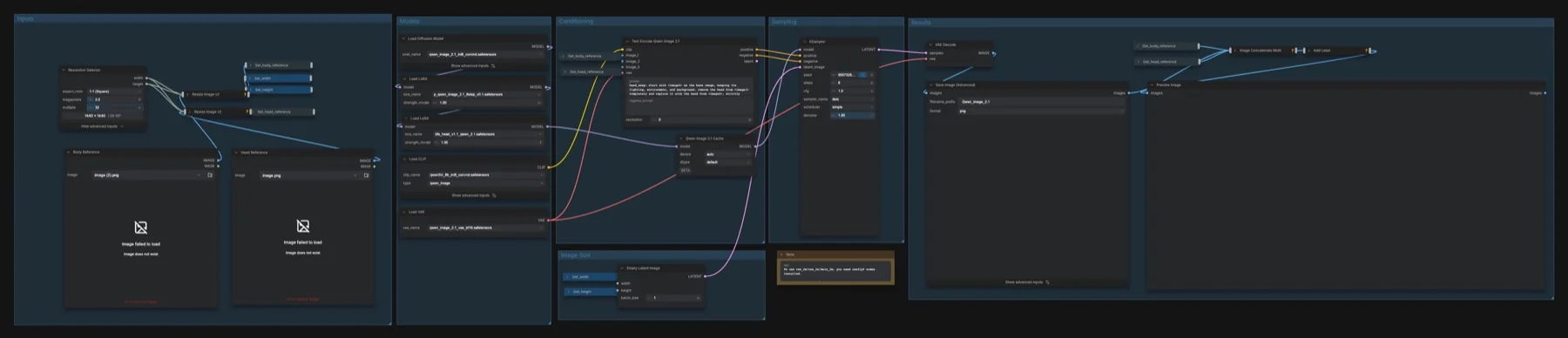
Short answer: This is our own Qwen-Image 2.1 workflow, not a built-in template. It takes a Body Reference photo and a Head Reference photo and puts the head from the second onto the first. It adds two LoRAs to the Qwen-Image 2.1 model: the community BFS head swap LoRA and an 8-step speed LoRA. It samples at 8 steps, CFG 1, deis and simple. The files with known sources total about 17.6 GB, plus the speed LoRA. Qwen-Image 2.1 uses a research licence that does not allow commercial use by default.
Output example
This workflow was run on a PC with an RTX 3090. We downloaded the saved output and inspected the image. It is one prompt and seed, not a general quality benchmark.

Input references

Generated in ComfyUI on a PC with an RTX 3090. No local image transform; uploaded saved output directly. Head-swap graph applies its saved reference resize.

Generated in ComfyUI on a PC with an RTX 3090. No local image transform; uploaded saved output directly. Head-swap graph applies its saved reference resize.
Prompt used for this example
head_swap: start with <image1> as the base image. Replace its entire head with the fictional copper-haired woman from <image2>, preserving her copper curls, freckles, green eyes, rounded nose and face shape. Keep the base body, mustard apron, white shirt, workshop shelves, pose and camera framing unchanged. Match the workshop daylight and blend the neck naturally.Observed limits: Facial features and skin are reconstructed rather than a biometric identity guarantee. Actual saved output is 1440x800, following reference conditioning despite the saved square selector.
You need consent from the person whose face you use, and you must follow the licence's use rules.
Download and load the workflow
Drag the downloaded JSON file onto the ComfyUI canvas to load it.
Install the model files and any custom nodes listed below. If the workflow uses input images, video or audio, select your own files in the input nodes before running it.
Which files go where
| Part | File | Size | Folder |
|---|---|---|---|
| Diffusion model | qwen_image_2.1_int8_convrot.safetensors | 7.26 GB | models/diffusion_models |
| Text encoder | qwen3vl_8b_int8_convrot.safetensors | 9.35 GB | models/text_encoders |
| VAE | qwen_image_2.1_vae_bf16.safetensors | 0.68 GB | models/vae |
| Head swap LoRA | bfs_head_v1.1_qwen_2.1.safetensors | 0.26 GB | models/loras |
| 8-step speed LoRA | p_qwen_image_2.1_8step_v0.1.safetensors | Unknown | models/loras |
The four linked files total 17.55 GB. None of the repositories is gated. The BFS LoRA is a community file (BFS Best Face Swap); the workflow has no link for it, so we found the repository ourselves.
The 8-step LoRA has no download link in the workflow, and we could not find its original source. We found only a third-party re-upload, so we do not link it. You have two other options: bypass that Load LoRA node (select it and press Ctrl+B) and raise the steps to 25 or more, or use Qwen-Image 2.1 Turbo, Alibaba's own 8-step checkpoint and LoRA. We have not checked how Turbo combines with the BFS LoRA.
Custom nodes: install ComfyUI-KJNodes (comfyui-kjnodes) from ComfyUI Manager. It provides Resize Image v2, Image Concatenate Multi and Add Label. The note in the graph says the res_2m, res_2s and deis_2m samplers need the RES4LYF pack. That pack is optional: the workflow uses deis, which is built into ComfyUI.
Settings in this workflow
| Setting | Value |
|---|---|
| Steps | 8 |
| CFG | 1 |
| Sampler / scheduler | deis / simple |
| Denoise | 1 |
| LoRA strengths | BFS head 1, 8-step 1 |
| Resolution Selector | 1:1 (Square), 2 megapixels, multiple of 32 |
| Resize Image v2 | lanczos, resize, centred, divisible by 32 |
| Text encoder resolution | 0 |
| Qwen Image 2.1 Cache | device auto, dtype default |
| Save Image (Advanced) | PNG, 8-bit, sRGB |
How to use it
- Load the photo you want to keep (pose, lighting, background) in Body Reference.
- Load the photo with the head you want in Head Reference.
- Keep the prompt in Text Encode Qwen Image 2.1. It starts with
head_swap:, treats<image1>as the base, and takes the hair, eye colour and nose from<image2>while copying gaze, head rotation and expression from<image1>. - Run the workflow. Save Image (Advanced) stores the result, and Preview Image shows body, head and result side by side with the prompt as a label.
Licence
The base files come from Comfy-Org/Qwen-Image-2.1, which lists the Qwen Research License: a research licence, not for commercial use by default. The BFS repository lists MIT, but it runs on the research-licensed base model. We do not know the licence of the 8-step LoRA. See our licence tracker.
Troubleshooting
| Problem | Likely cause | Fix |
|---|---|---|
| Resize Image v2, Image Concatenate Multi or Add Label is red | KJNodes is not installed | Install ComfyUI-KJNodes from ComfyUI Manager and restart. |
Error about p_qwen_image_2.1_8step_v0.1 | The speed LoRA is missing | Bypass that Load LoRA node and use 25 or more steps, or switch to Turbo. |
| res_2m or res_2s is not in the sampler list | RES4LYF is not installed | Install RES4LYF, or keep deis. |
| The wrong head ends up on the body | The two photos are swapped | Put the body in Body Reference (image 1) and the head in Head Reference (image 2). |
| Out-of-memory error | 2 megapixels is too large for your GPU | Lower megapixels in Resolution Selector. |
Where to go next
- The template this build starts from: Qwen-Image 2.1 image edit.
- Official 8 steps: Qwen-Image 2.1 Turbo in ComfyUI.
- Plain generation: Qwen-Image 2.1 text to image.
FAQ
Is this a built-in ComfyUI template?
No. It is our own build on top of Qwen-Image 2.1, with a community LoRA.
Can I run it without the 8-step LoRA?
Yes. Bypass that Load LoRA node and raise the steps to 25 or more.
Do I need RES4LYF?
No. The workflow uses deis, which ships with ComfyUI. RES4LYF only adds the extra samplers named in the note.
Sources
- Comfy-Org/Qwen-Image-2.1 on Hugging Face: base model files, sizes and licence
- Alissonerdx/BFS-Best-Face-Swap on Hugging Face: the head swap LoRA, its MIT licence and Qwen-Image 2.1 notes
- RES4LYF on GitHub: optional samplers named in the workflow note
- QwenLM/Qwen-Image-2.1 on GitHub: official project and licence text