
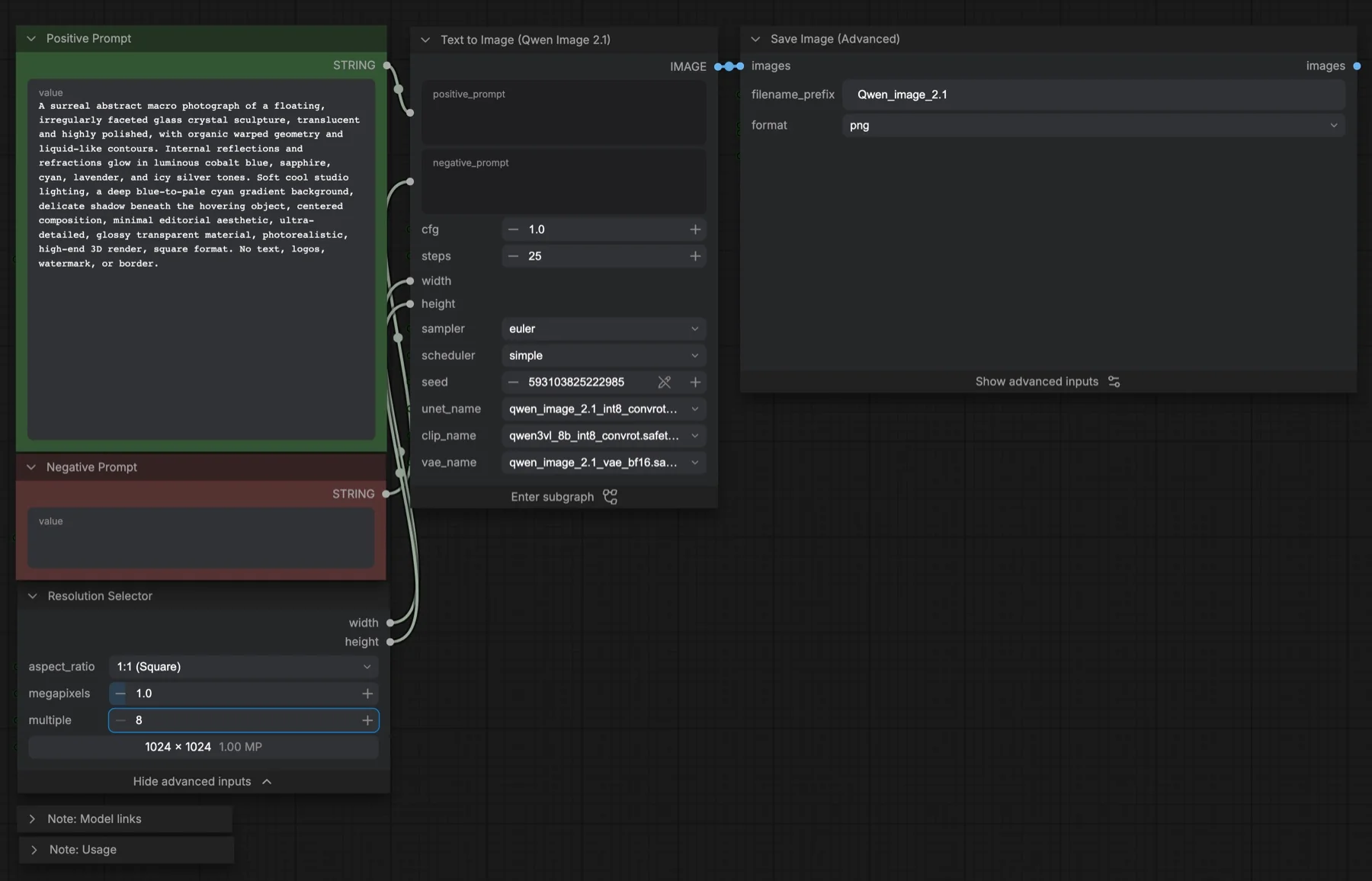
Short answer: The built-in Qwen Image 2.1: Text to Image template makes one image from a text prompt with Qwen-Image 2.1. It starts at 1024 × 1024, 25 steps, CFG 1, the euler sampler and the simple scheduler. It loads three files, about 17.3 GB in total. The licence is the Qwen Research License, which does not allow commercial use by default.
Output example
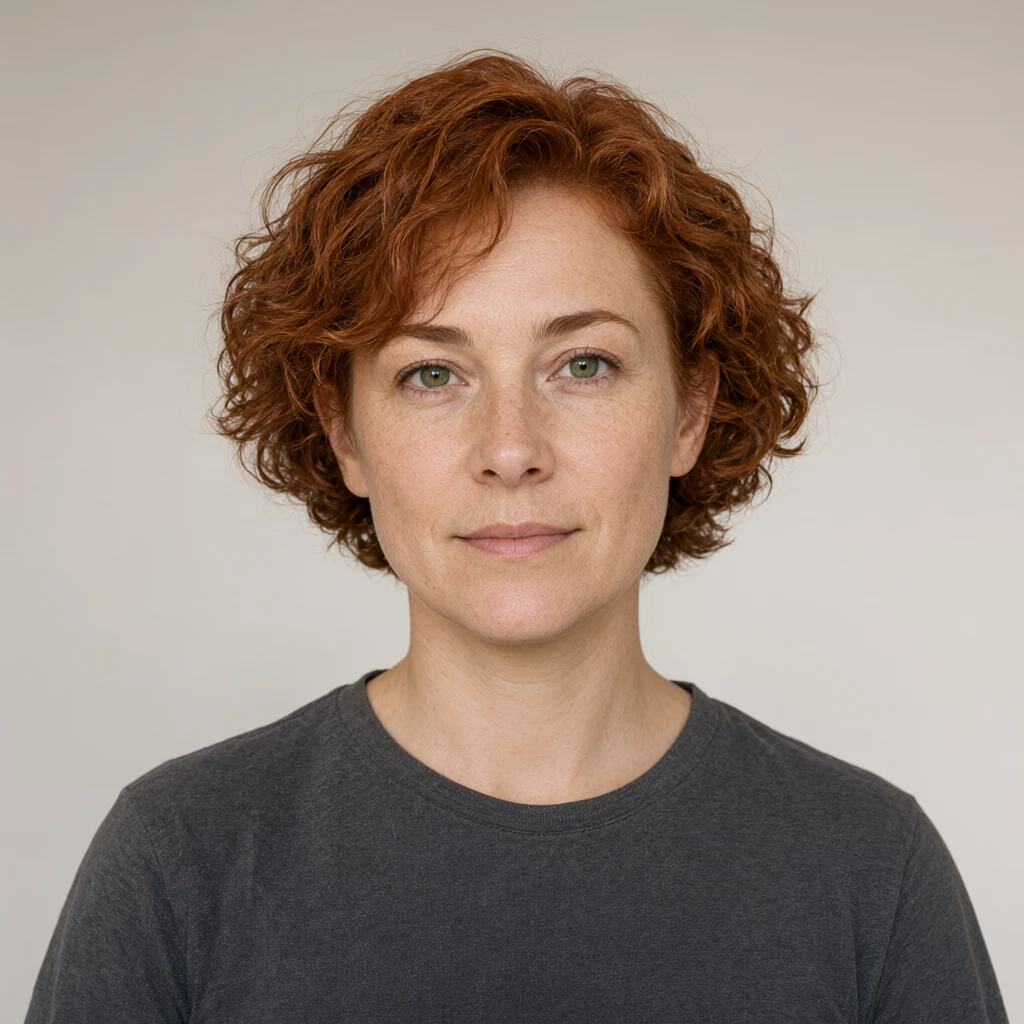
This workflow was run on a PC with an RTX 3090. We downloaded the saved output and inspected the image. It is one prompt and seed, not a general quality benchmark.
Prompt used for this example
The image is a studio character-design photograph of an entirely fictional adult woman against a warm light grey seamless background. At the center, her head and upper shoulders face directly forward with an easy closed-mouth expression. Her face has pale freckled skin, a broad rounded nose, green eyes and strongly arched eyebrows. Short copper-red curly hair frames her face and exposes her ears. She wears a plain charcoal crew-neck shirt with no jewelry. Both ears and the full hair silhouette are inside the frame. Soft diffuse daylight from upper left creates a gentle shadow under the chin, fine skin texture and clear individual curls. This is a newly invented synthetic character, not a depiction of a real person. The background remains simple and evenly lit.Observed limits: New synthetic character, not a real-person reference. No identity match or real-person consent claim is made.
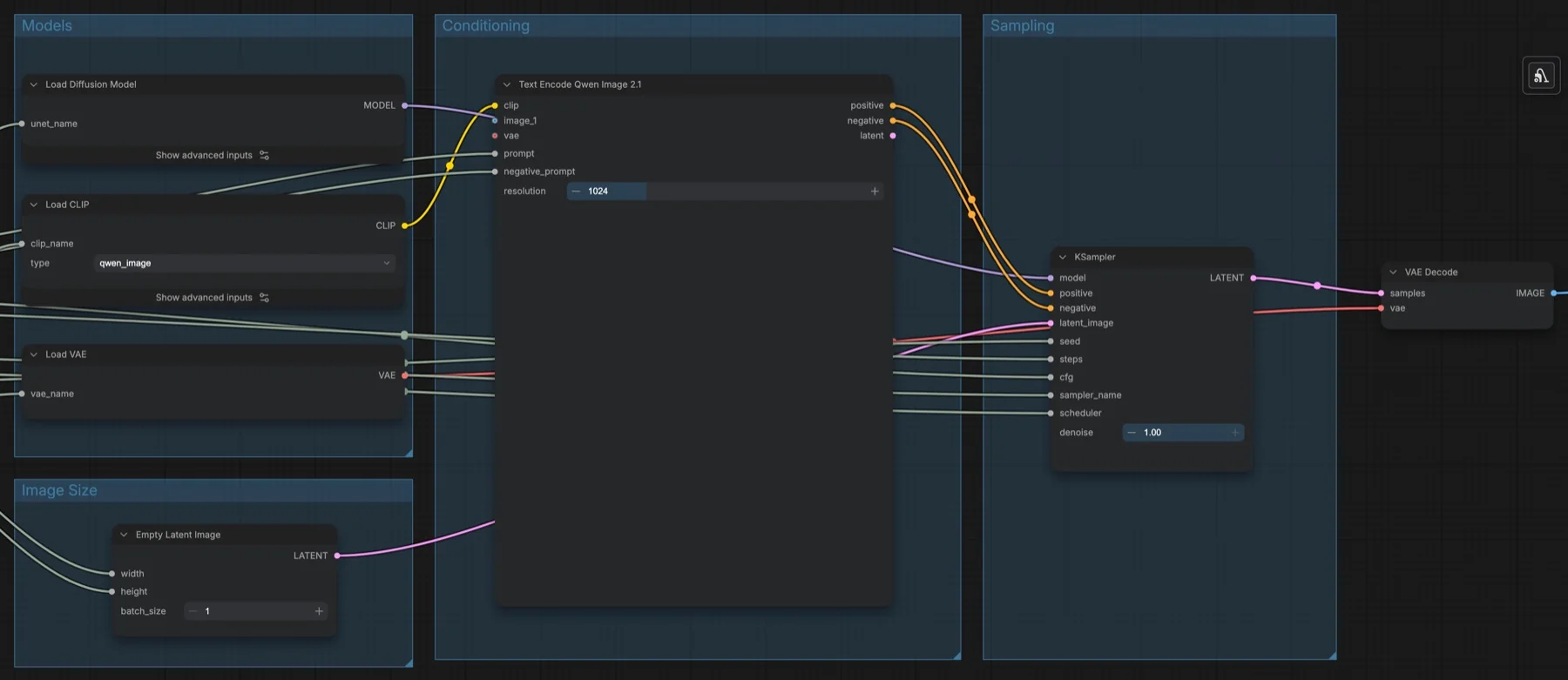
Download and load the workflow
Drag the downloaded JSON file onto the ComfyUI canvas to load it.
Install the model files and any custom nodes listed below. If the workflow uses input images, video or audio, select your own files in the input nodes before running it.
Which files go where
All three files come from Comfy-Org/Qwen-Image-2.1. The repository is not gated, so you can download without signing in. No custom node packs are needed.
| Part | File | Size | Folder |
|---|---|---|---|
| Diffusion model | qwen_image_2.1_int8_convrot.safetensors | 7.26 GB | models/diffusion_models |
| Text encoder | qwen3vl_8b_int8_convrot.safetensors | 9.35 GB | models/text_encoders |
| VAE | qwen_image_2.1_vae_bf16.safetensors | 0.68 GB | models/vae |
Total: 17.29 GB. The workflow note also lists full-precision BF16 versions of the diffusion model and text encoder (qwen_image_2.1_bf16 and qwen3vl_8b_bf16) in the same repository. They are larger, so the template uses the INT8 files.
Settings in this workflow
| Setting | Value |
|---|---|
| Resolution Selector | 1:1 (Square), 1.0 megapixels, multiple of 8, giving 1024 × 1024 |
| Steps | 25 |
| CFG | 1.0 |
| Sampler / scheduler | euler / simple |
| Denoise | 1.00 |
| Text encoder resolution | 1024 |
| Negative prompt | Empty |
| Save Image (Advanced) | PNG, 8-bit, sRGB, prefix Qwen_image_2.1 |
CFG (classifier-free guidance) controls how strongly the model follows the prompt against the negative prompt. At CFG 1 the negative prompt has no effect.
How to use it
- Write your prompt in the Positive Prompt node.
- Leave Negative Prompt empty unless you raise CFG.
- Pick an aspect ratio and size in Resolution Selector.
- Check that
unet_name,clip_nameandvae_nameon the subgraph match your files. - Run the workflow. The image is saved as a PNG.
Native 2K, transparency and steps
The workflow's usage note gives four tips:
- Native 2K: set Resolution Selector to 1:1 and 4 megapixels for 2048 × 2048. The note says to prefer sides that are multiples of 32.
- Transparent images: wrap your subject in this sentence: "This is an RGBA format image with transparency. [your description]. The image has an alpha channel and a transparent background." Save as PNG to keep the alpha channel.
- Steps: the official Qwen-Image 2.1 pipeline uses about 40 to 50 steps with euler. The template starts at 25. The note adds that more advanced samplers need fewer steps.
- CFG: keep it at 1 for the official path. Raise it only if you write a negative prompt.
If you want fewer steps, read our Qwen-Image 2.1 Turbo guide. Turbo runs in 8 steps at CFG 1.
Licence
The Comfy-Org/Qwen-Image-2.1 repository lists the Qwen Research License. It is a research licence, not for commercial use by default. Read it before you make images for clients. For an Apache-2.0 option, see MOSS-Image text to image. Our licence tracker compares the current models.
Troubleshooting
| Problem | Likely cause | Fix |
|---|---|---|
| Text Encode Qwen Image 2.1 shows as a missing node | ComfyUI is too old | Update ComfyUI and restart. |
| A model picker is empty | The file is in the wrong folder | Move it to the folder in the table above and refresh. |
| The negative prompt changes nothing | CFG is 1 | Raise CFG if you want to use a negative prompt. |
| Background is not transparent | The RGBA wording is missing, or the file was not saved as PNG | Use the wrapper sentence above and keep the PNG format. |
| Out-of-memory error | Output set to 2K, or BF16 files selected | Go back to 1 megapixel and the INT8 files. |
Where to go next
- Faster images in 8 steps: Qwen-Image 2.1 Turbo in ComfyUI.
- Change an existing picture: Qwen-Image 2.1 image edit in ComfyUI.
- Need a commercial-friendly licence? MOSS-Image text to image.
FAQ
Can I use Qwen-Image 2.1 commercially?
Not by default. The repository lists the Qwen Research License. Read it before any paid work.
Why does the template use 25 steps?
The note says the template starts at 25 steps. The official pipeline uses about 40 to 50 with euler, so raise the step count for final images.
Can it make 2048 × 2048 images directly?
Yes. The note says Qwen-Image 2.1 supports native 2K. Set 1:1 and 4 megapixels in Resolution Selector.
Sources
- Comfy-Org/Qwen-Image-2.1 on Hugging Face: weight files, sizes and licence
- Comfy-Org/Qwen-Image-2.1 on ModelScope: mirror listed in the workflow note
- QwenLM/Qwen-Image-2.1 on GitHub: official project and licence text
- ComfyUI subgraph guide: how subgraph nodes work
- How to update ComfyUI: linked from the workflow note
- ComfyUI workflow templates issues: where to report template problems