
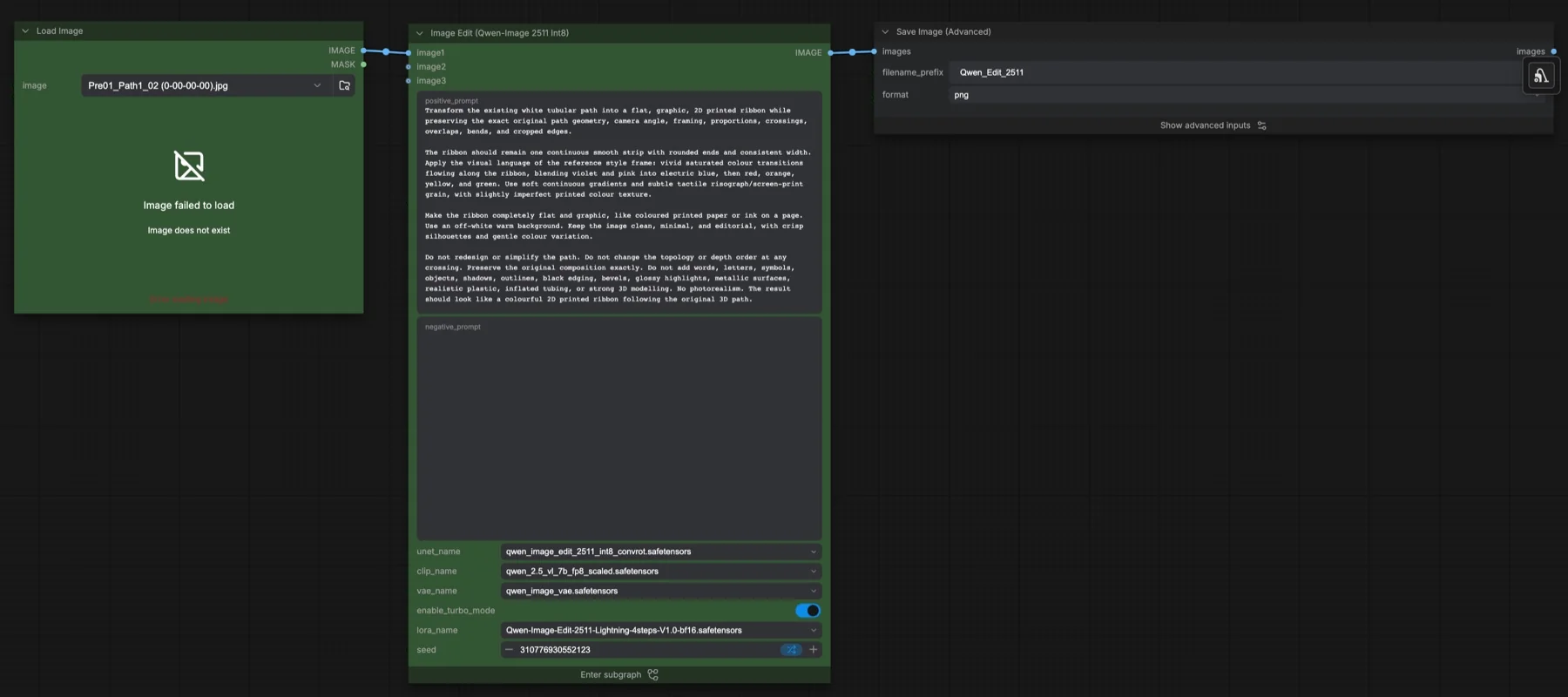
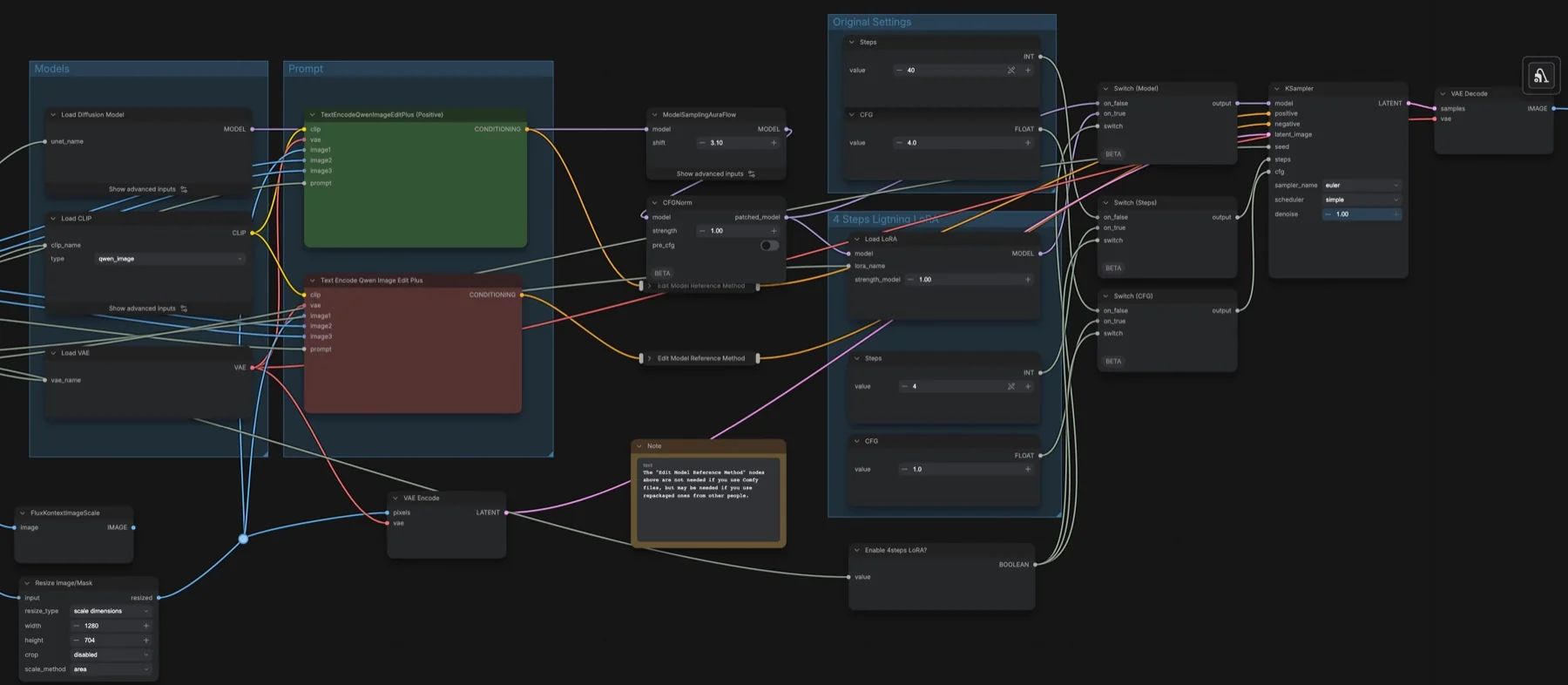
Short answer: this built-in ComfyUI template edits an image from a text instruction with Qwen Image Edit 2511 Int8. One switch picks the speed: with the Lightning LoRA on (the default) it runs 4 steps at CFG 1; with it off it runs 40 steps at CFG 4. Both use euler, simple and shift 3.1, and the main image is resized to 1280 × 704. The four files it loads total about 31 GB. The model, VAE and LoRA repositories list Apache-2.0; the text encoder's repository lists a Tencent community licence with conditions.
Output example
This workflow was run on a PC with an RTX 3090. We downloaded the saved output and inspected the image. It is one prompt and seed, not a general quality benchmark.

Input references
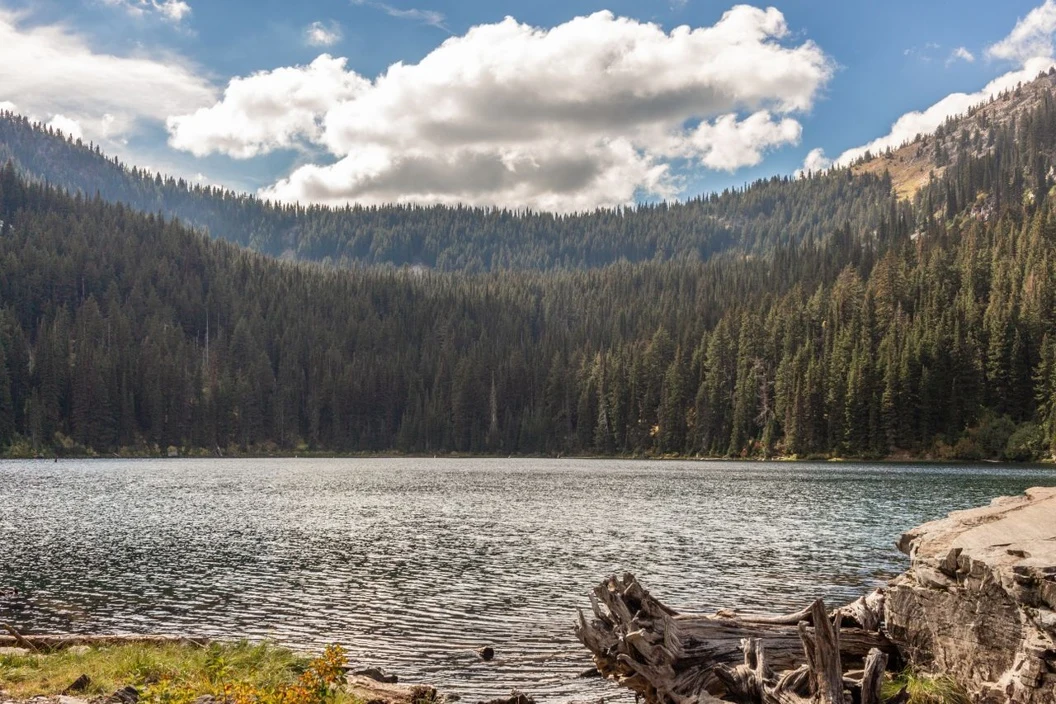
Clay Elliot · Source licence. Pillow proportional thumbnail to fit 1280x704, JPEG quality 95; upscale fixture fits 384x216, JPEG quality 80
Prompt used for this example
Restyle this mountain lake photograph as a hand-painted gouache travel illustration. Preserve the recognizable mountain silhouettes, forested shoreline and mirrored lake composition. Use layered flat shapes, visible dry-brush paper texture, warm peach sky, teal water and dark pine-green trees. No lettering or added buildings.Observed limits: Saved internal 1280x704 resize changes the 3:2 input aspect to widescreen, stretching geometry; retained as the requested saved-recipe fixture. Lightning mode only.
Download and load the workflow
Drag the downloaded JSON file onto the ComfyUI canvas to load it.
Install the model files and any custom nodes listed below. If the workflow uses input images, video or audio, select your own files in the input nodes before running it.
Which files go where
| Part | File | Size | Folder |
|---|---|---|---|
| Diffusion model | qwen_image_edit_2511_int8_convrot.safetensors | 20.5 GB | models/diffusion_models |
| Text encoder | qwen_2.5_vl_7b_fp8_scaled.safetensors | 9.38 GB | models/text_encoders |
| Lightning LoRA | Qwen-Image-Edit-2511-Lightning-4steps-V1.0-bf16.safetensors | 0.85 GB | models/loras |
| VAE | qwen_image_vae.safetensors | 0.25 GB | models/vae |
The total is about 31 GB. None of the four repositories is gated. A LoRA is a small add-on file that changes how the main model behaves; this one lets it finish in 4 steps. The Load LoRA node stays in the graph when turbo mode is off, so download the file either way. No custom node packs are needed.
Settings in this workflow
| Setting | Turbo on (default) | Turbo off |
|---|---|---|
| Lightning LoRA | On, strength 1 | Off |
| Steps | 4 | 40 |
| CFG | 1 | 4 |
| Sampler and scheduler | euler, simple, denoise 1 | |
| Shift (ModelSamplingAuraFlow) | 3.1 | |
| CFGNorm strength | 1 | |
| Main image size | 1280 × 704 (scale dimensions, no crop, area) | |
| Reference method | index_timestep_zero on both conditioning paths | |
| Output | PNG, 8-bit, sRGB | |
CFG (classifier-free guidance) sets how strongly the prompt steers the result. At CFG 1 the negative prompt has no effect; at CFG 4 it does. The KSampler itself stores 40 steps and CFG 3, but its steps and CFG are wired to the switches, so the values above are what run.
How to use it
- Pick your source image in Load Image. It goes to image1, which sets the output size.
- Optionally connect extra images to image2 and image3, for example a style frame. They go to both prompt encoders.
- Write the edit in positive_prompt. Add a negative_prompt only if turbo mode is off.
- Leave enable_turbo_mode on for 4 steps, or turn it off for the 40-step settings.
- Run the queue. Save Image (Advanced) writes PNGs with the prefix
Qwen_Edit_2511.
The Edit Model Reference Method nodes
The note inside the subgraph says the two Edit Model Reference Method nodes are not needed with the Comfy-Org files. They may be needed if you use repackaged files from other people. Leave them in place unless you know your files do not need them.
The example prompt shows a useful pattern for strict edits: say what to change, then list what must stay the same (geometry, camera angle, framing, crossings) and what must not appear.
Licence
The model, VAE and LoRA repositories list Apache-2.0, which allows commercial use. The text encoder file is hosted in Comfy-Org/HunyuanVideo_1.5_repackaged, which lists tencent-hunyuan-community. That licence has conditions, so read it before commercial use. Our licence tracker compares the models we cover.
Troubleshooting
| Problem | Likely cause | Fix |
|---|---|---|
| "Image failed to load" in Load Image | The example image is not included | Pick your own image. |
| Missing LoRA error | The Lightning LoRA is not in models/loras | Download it into models/loras and refresh. |
| Edits look wrong with files from another source | Repackaged files may need the reference method | Keep both Edit Model Reference Method nodes connected, or use the Comfy-Org files. |
| Output has the wrong shape | image1 is resized to 1280 × 704 | Change width and height in Resize Image/Mask. |
| Out-of-memory error | The image size is too large for your GPU | Lower the Resize Image/Mask dimensions and use fewer extra images. |
Where to go next
- Another edit workflow with reference slots: FLUX 3 Klein image edit in ComfyUI.
- Edit with Qwen-Image 2.1: Qwen-Image 2.1 image edit in ComfyUI.
- Enlarge your edits: SeedVR2 7B image upscale in ComfyUI.
FAQ
Do I need the Lightning LoRA?
It is only used in turbo mode. With turbo off, the KSampler gets the model without the LoRA and runs 40 steps at CFG 4. Keep the file in models/loras anyway, because the Load LoRA node is still in the graph.
How many images can I feed in?
Three: image1, image2 and image3. image1 sets the output size.
Can I use it commercially?
The model, VAE and LoRA repositories list Apache-2.0. The text encoder's repository lists a Tencent community licence with conditions, so read that before commercial use.
Sources
- Comfy-Org/Qwen-Image-Edit_ComfyUI on Hugging Face: Int8 diffusion model, size and licence
- lightx2v/Qwen-Image-Edit-2511-Lightning on Hugging Face: 4-step LoRA, size and licence
- Comfy-Org/Qwen-Image_ComfyUI on Hugging Face: VAE file and licence
- Comfy-Org/HunyuanVideo_1.5_repackaged on Hugging Face: text encoder file and its licence